Run Profile
DevAssure Run Profiles empower you to define comprehensive test execution environments, encompassing browsers, resolutions, headless mode, parallel execution, retry settings, and timeouts. This flexibility allows you to optimize your testing process, enhance test coverage, and streamline development workflows.
Run Profiles are specific configurations that define the combination of browsers and resolutions and other settings required for effective test execution.
By creating and managing Run Profiles, you can:
- Simplify Test Configuration: Organize test configurations into reusable profiles, reducing redundancy and streamlining setup.
- Ensure Consistent Testing: Guarantee consistent test execution across different environments and configurations.
- Enhance Test Coverage: Test your application on a wider range of browsers, resolutions, and execution modes.
Create a run profile:
- Navigate to the Test Profiles section in the side navigation.
- Within Run Profiles, click on the Add new icon that becomes visible when hovering over the shared profile or my profile in the explorer
- Select New Run Profiles and enter profile name.
Configure Settings:
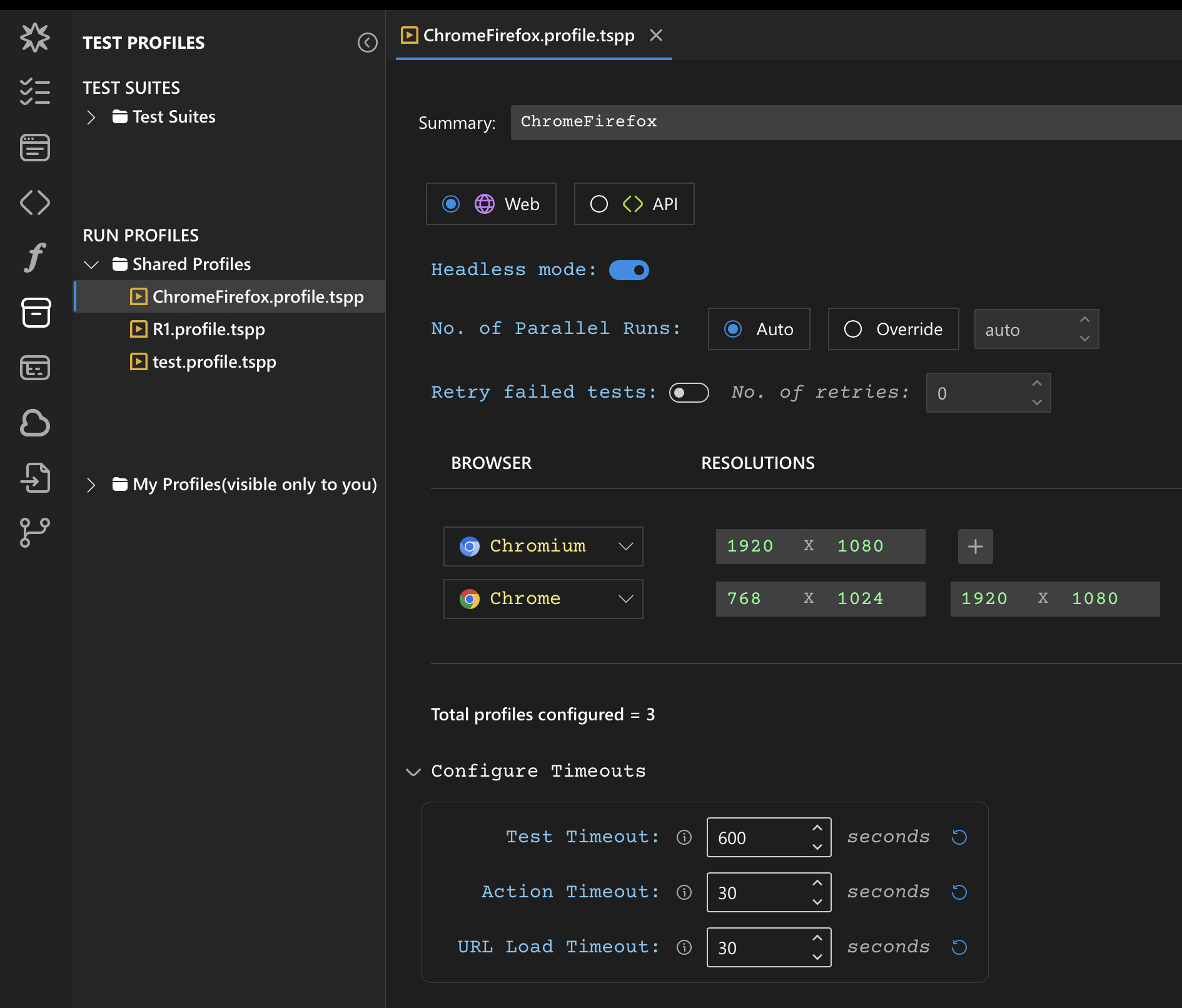
- Select the Test type (Web or API) applicable to the profile.
- Toggle the "Headless Mode" switch to enable or disable headless browser execution for this profile.
- Set the "No. of Parallel Runs" to specify the maximum number of tests that can be executed concurrently using the override option.
- Enable the "Retry failed tests" option and specify the number of retries.
Configure Browser & Resolution:
- In the editor, click on Add Browser to choose the browsers** relevant to your test and specify the resolution.
-
You can include multiple resolutions for the same browser.
-
Click on the
 icon and input the preferred resolution to be tested on the browser.
Configure Timeouts:
Configure appropriate timeouts for various test execution aspects (e.g., page load, test action execution).
- Test Timeout: Set the maximum time a single test can run. If the test exceeds this timeout, it will be terminated. The default is 10 minutes.
- Action Timeout: Set the maximum time a single action will wait for a condition to be met. If the action exceeds this timeout and the condition is not met, it will fail. The default is 30 seconds.
- URL Load Timeout: Set the maximum time within which any URL should load. This applies to all page loads and redirects, including those triggered by UI actions like clicks. The default is 30 seconds.
Using Run Profile in Test Execution:
Once you've created Run Profiles, you can associate them with specific test cases or test suites.
When you execute a test with configure and run option, you can select the configured Run Profiles to run the test across the specified browsers, resolutions and other settings.
Browser supported
DevAssure supports the latest versions of most common browsers including,
- Firefox
- Chrome
- Edge
- Safari
- Chromium
- Emulator
If your test suite is using Chrome/Edge, you need to make sure the machine running tests contains the browser installed. DevAssure can install and manage Chromium, Safari, Firefox and other emulated browsers.