API Automation Testing > What It Is, How It Works, and Why Teams Need It

Some mornings, the test report feels like a puzzle you didn’t sign up for- dozens of UI failures, none pointing to the real issue. Maybe a selector broke, maybe a component was slow. Meanwhile, a few API tests could’ve surfaced the real problem early, clearly, and without the usual noise.
This happens because today’s SaaS systems rely on APIs more than ever- internal, external, partner integrations, you name it. And issues tend to surface at the API layer long before the UI reacts. OWASP’s API Security Top 10 highlights this too, calling APIs one of the most “high-impact failure points” in modern architectures because of their central role in app behavior.
This guide breaks down API automation testing in a simple, practical way so your team can build stability without drowning in complexity.
What Is API Automation Testing?
At its core, API automation testing is basically checking whether two systems can talk to each other the way they’re supposed to but doing it automatically, without a human poking buttons or refreshing a screen. Instead of testing through the UI, you test the actual requests and responses that power your product underneath.
Think of it like this:
Your app sends a request → the API replies → your test checks if that reply makes sense. If it does, great. If not, you know exactly where things broke without digging through UI layers that had nothing to do with the problem.
How it differs from UI testing
UI tests check what the user sees. API tests check the logic powering everything the user sees.
That’s why they’re faster, less flaky, and way easier to maintain. A UI test might break because a button moved. An API test breaks only when the behavior breaks, which is exactly what teams care about.
This is where DevAssure fits naturally into the picture. DevAssure is a unified, AI-driven testing platform designed to remove the usual friction teams face when scaling API automation.
It takes care of all the messy parts of API automation- the data setup, the environments, the auth quirks so you’re not wrestling with flaky runs or test cases that behave differently every day. DevAssure adapts to your app, not the other way around, and helps you automate deeper flows much earlier without the usual overhead.
Key Benefits of API Automation Testing
Once teams start using API automation, the advantages show up almost immediately. Here are the benefits that teams feel the most.
1. More coverage with far less effort
With UI tests, every new screen or flow adds maintenance overhead. API tests don’t care about layout changes or button labels. You can cover dozens of scenarios with a handful of requests and assertions. It’s one of the few testing areas where you get high ROI without scaling your team endlessly.
2. Faster feedback loops
API tests run in seconds, not minutes. When they fail, you know why. This is a huge deal during active development- nobody wants to wait 40 minutes for a UI suite to finish only to discover a tiny backend mistake.
3. Less flakiness = more trust in your test suite
UI tests break for reasons that have nothing to do with real bugs. API tests are the opposite. They fail only when something meaningful changes in logic or data. Teams end up trusting test results again instead of “re-running the suite just in case.”
4. Lower cost of maintenance
Maintaining hundreds of UI tests can drain entire sprints. API tests are leaner. They’re easier to version, easier to update, and easier to run in parallel. Over time, this cuts testing costs and keeps QA velocity steady even as your product grows.
5. Better alignment across teams
API tests act like shared documentation. Devs, QA, and even product folks can read them and understand what the system expects. It reduces back-and-forth and makes debugging issues feel less like guesswork.
6. Stronger release confidence
When your core API layer is tested thoroughly, every release feels lighter. You’re not depending on UI tests to catch logic issues. You know your fundamentals are sound which is exactly what matters in fast-moving SaaS environments.
How API Automation Testing Works (Step-by-Step Guide)
API automation sounds complex from a distance, but it follows a pretty straightforward flow once you break it down. Here’s the simplest version that still covers everything teams actually need.
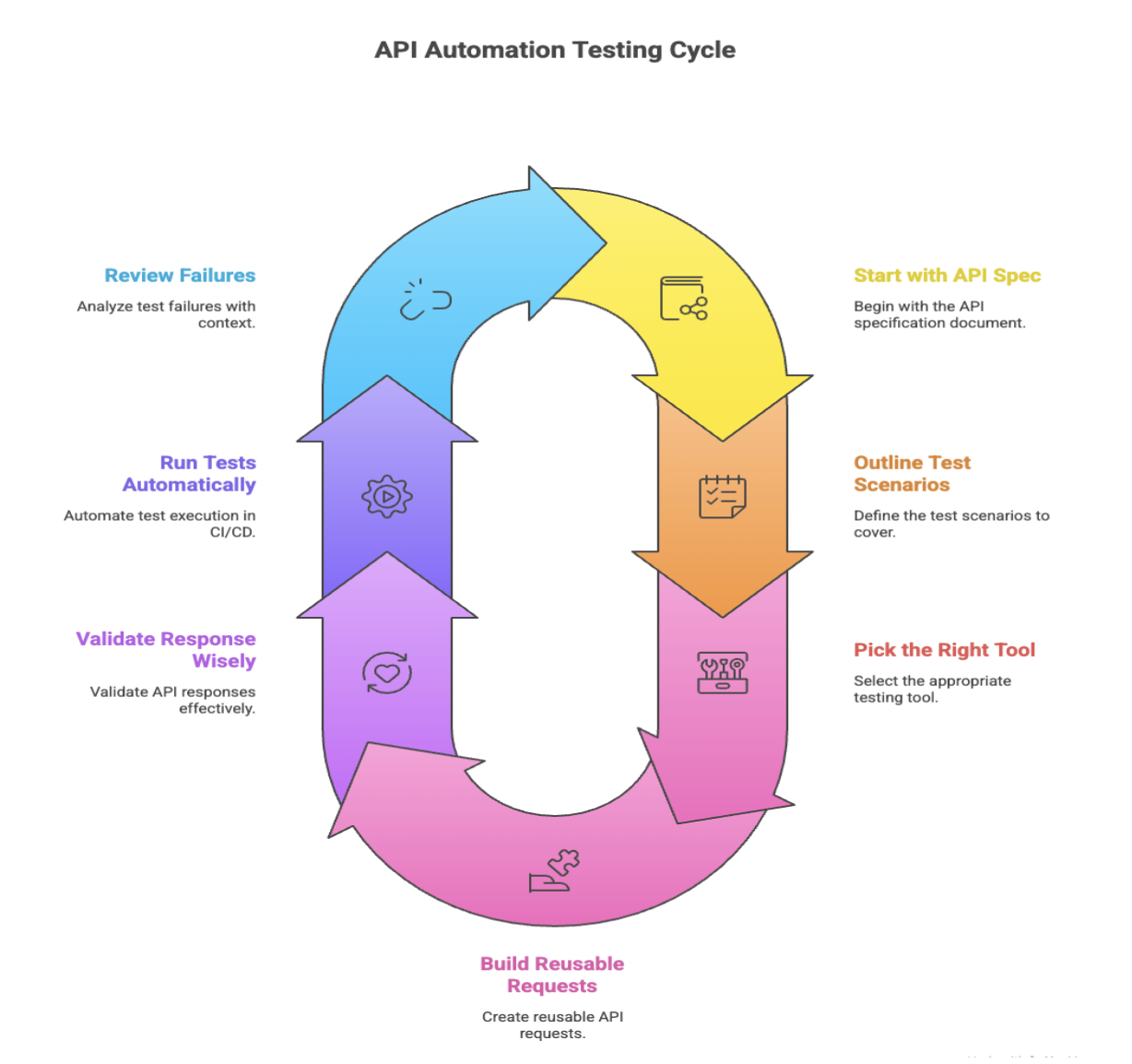
Step 1 — Start with the API spec
Before writing a single test, look at the API contract (OpenAPI/Swagger, GraphQL schema, etc.). This tells you what to test instead of guessing.
Quick win: Map one or two critical endpoints first, not the whole API.
Step 2 — Outline your test scenarios
Keep it clean and structured:
- Happy paths
- Negative cases
- Edge cases
- Basic contract/schema checks
You don’t need 50 tests on day one. Start with 5–10 high-value flows.
Step 3 — Pick the right tool for your stack
Choose something your team can actually maintain:
- Rest Assured (Java)
- Karate (simple + readable)
- Playwright/Cypress API (if you already use them)
- K6 (for performance)
Tip: Don’t overthink this- the tool matters less than consistency.
Step 4 — Build reusable requests
Centralize all the things you’ll use everywhere:
- Base URLs
- Headers
- Tokens/auth setup
- Sample payloads or fixtures
This saves you hours later when an endpoint changes.
Step 5 — Validate the response wisely
Check the things that actually matter:
- Status codes
- Essential fields (schema)
- Business rules
- Basic timing/performance if needed
Skip over-asserting-that’s where most flakiness comes from.
Step 6 — Run tests automatically in CI/CD
Tie your tests into your CI/CD pipeline:
- Run smokes on every pull request
- Run full suites on nightly/merge to main
- Block releases only on critical failures
Containerizing your test runner keeps everything consistent across environments.
Step 7 — Review failures with real context
A failed test should tell you:
- What request was sent
- What response came back
- Logs or error messages
This makes debugging way faster and keeps false alarms to a minimum.
If your team struggles with inconsistent environments, the DevAssure platform helps standardize and automate test execution across staging, QA, and pre-prod without all the usual setup overhead. Schedule a demo to learn more.
Common Challenges in API Automation
API automation sounds clean on paper, but the reality is never that tidy. Teams usually hit a few bumps early on — things that slow momentum if you don’t catch them quickly. Here are the common ones and what actually helps.
- Documentation that doesn’t match reality: Most teams have been here: the Swagger spec says one thing, the API returns something slightly different, and your tests start failing for reasons that aren’t bugs.
- Handling dynamic or unstable data: APIs that rely on user accounts, tokens, or time-sensitive fields can be tricky to test. One day the data exists; the next day it doesn’t.
This is where having a proper test data management solution can save teams from chaos. Tools like DevAssure keep data stable, predictable, and always fresh so you’re not guessing whether the record exists or if a token quietly expired.
- Authentication complexity: Auth flows, rotating tokens, JWT expirations- these can break tests more often than actual bugs.
- Too many tests depending on each other: One test creates a record. Another test reads it. Another deletes it. It works until it doesn’t. Then you spend half a day chasing test dependencies.
- Environments that behave differently: Local works. Dev works. Staging not so much. APIs behave differently across environments, and tests start failing inconsistently.
- Test noise that hides real failures: When too many assertions check irrelevant things, the suite becomes noisy. Important failures get buried under false alarms.
Best Practices for API Automation Testing
API automation is about writing the right tests that stay reliable over time. Here are the practices teams swear by once they move beyond the basics.
1. Shift-left as early as you can
The earlier you write API tests, the fewer surprises later. Many teams now validate the API contract before the endpoint is even fully implemented. It sounds small, but this alone reduces a lot of back-and-forth between dev and QA.
2. Keep your tests independent
If Test A relies on Test B running first, you’re setting yourself up for pain. Each test should set up what it needs, run, and clean up after itself. That independence makes your suite more stable and easier to parallelize.
3. Centralize your config and helpers
Auth handling, base URLs, headers, common payloads- put them in one place. You don’t want to update 40 tests because a token format changed.
4. Validate what matters, ignore the noise
You don’t need to assert every field in the response. Focus on:
- Critical schema fields
- Logic or rules
- Anything that impacts user-facing behavior
5. Version your tests with the API
If the API spec changes, the tests should change too in the same PR. This keeps your suite aligned with reality and prevents “mysterious failures” caused by outdated expectations.
6. Add a lightweight smoke suite
A small “does the API even respond correctly?” suite that runs on every pull request gives fast feedback. Save heavier tests for nightly or merge pipelines.
7. Don’t forget production monitoring
Your best API tests can double as monitors. When an endpoint fails in production, you’ll know instantly (and with clearer context than traditional uptime tools).
Tools / Popular Frameworks for API Automation Testing
| Tool / Framework | Best For | Why Teams Use It | Ideal Use Cases |
|---|---|---|---|
| Rest Assured (Java) | Java-based teams | Strong DSL, great assertions, integrates smoothly with CI | Backend-heavy SaaS products, microservices written in Java |
| Karate Framework | Teams wanting readable, low-code tests | Combines API testing, mocks, and UI in one place | Functional tests, contract tests, quick onboarding for non-devs |
| Playwright (API mode) | Teams already using Playwright for UI | Unified framework for UI + API, super fast API engine | PR checks, contract tests, integration tests |
| Cypress (API testing) | JavaScript-centric teams | Simple setup, great ecosystem, predictable runs | Smoke tests, regression checks, combined UI + API suites |
| K6 | Performance and load testing | Scriptable, lightweight, CI-friendly | Stress tests, baseline performance checks, SLA tracking |
| HTTPie / curl + scripts | Teams wanting ultra-light tests | Zero overhead, great for quick smokes or debugging | Health checks, quick pipelines, minimalist CI jobs |
How DevAssure Strengthens API Automation
Most teams approach API automation by stitching together scripts, tools, and environments but that only works for a while. DevAssure takes a completely different route. It brings API, data, and environment automation into a single, AI-driven platform designed to keep tests stable no matter how fast your product evolves.
Here’s what that looks like in practice:
1. Clean, consistent test data every time
A large chunk of API test failures come from missing, expired, or inconsistent data. DevAssure solves this at the root by generating and managing controlled, reusable, production-like data that stays consistent across runs and environments. No more “works on dev, fails on QA” moments.
2. Automation workflows built for real engineering teams
Every API test in DevAssure runs on top of stable environments, seeded data, and orchestrated configurations. The platform ensures the same behavior in local, QA, staging, and CI pipelines which dramatically reduces flakiness and reruns.
3. Designed for modern QA teams
Debugging API failures gets complicated when you have dozens of services talking to each other. DevAssure helps teams:
- Surface logic issues early,
- Track API behavior across environments,
- And maintain stable pipelines even in rapid release cycles.
It’s built for the reality of modern QA- fast-moving apps, constant changes, and complex integration points.
4. Works with your existing automation stack
Rest Assured, Playwright, Cypress, Karate- whichever you prefer, DevAssure slips into your workflow without forcing you to rewrite your test framework. The platform acts as a stabilizing layer underneath, making every suite more predictable.
Wrapping Up
API automation testing gives teams a clearer picture of what’s happening behind the scenes. Once you get a small, stable set of tests running, releases feel lighter and debugging stops eating half your day.
You don’t need a massive setup to see the difference- just a few meaningful scenarios and a workflow your team can actually maintain. And if test data has been your biggest roadblock, DevAssure can take a lot of that pain away. Start small, stay consistent, and let your suite grow with your product.
🚀 See how DevAssure accelerates test automation, improves coverage, and reduces QA effort.
Ready to transform your testing process?