How to Build an E2E Web Testing Agent with Claude - No Selectors, No Scripts, No Frameworks

Write your test cases in plain English. Let Claude drive the browser, find the bugs, and report back - no selectors, no assertions, no framework to maintain.
By the end of this blog, you will have a working Python script that reads a YAML test spec, spins up a headless browser, and uses Claude's tool-use API to autonomously navigate your application, evaluate its behaviour, and produce a structured test execution report.
A traditional test script describes a mechanism => click this selector, wait for that condition, assert this value.
A testing agent describes an intent => verify the discount is applied after tax, not before, and figures out the mechanism itself at runtime.
That shift from mechanism to intent is the reason this approach is resilient to UI changes. When the checkout button gets a new CSS class, the intent is still valid. The agent adapts. No human fix required.
What Is a Testing Agent?
A traditional automated test is a static script: a fixed sequence of DOM selectors, click actions, and hardcoded assertions. It breaks every time the interface changes. It requires engineers to diagnose, fix, and re-run. And it can only verify the specific things the original author thought to check.
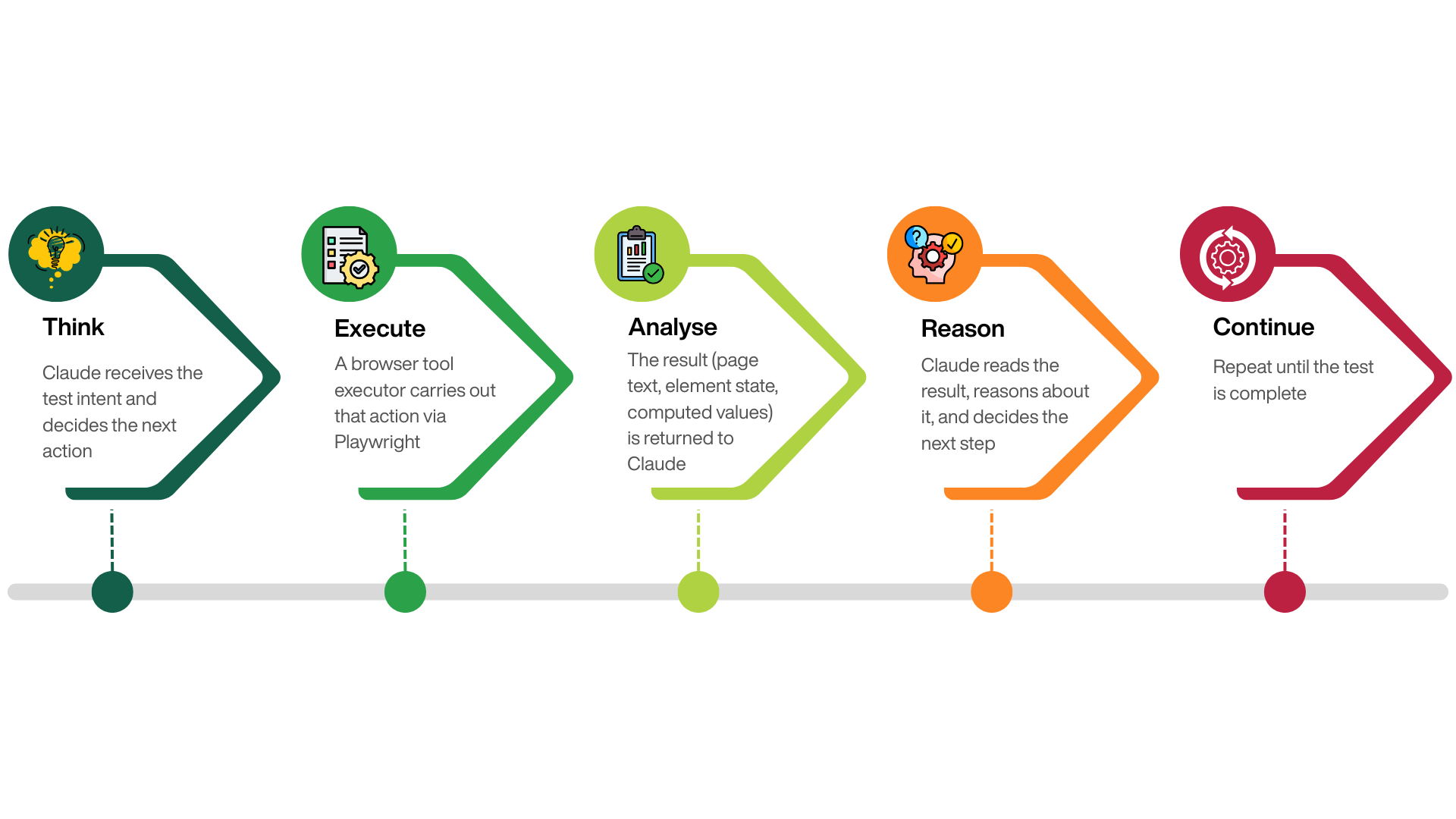
A testing agent is different. You give it a goal - expressed in plain English - and it determines how to achieve that goal against the live application. The loop looks like this:
Architecture
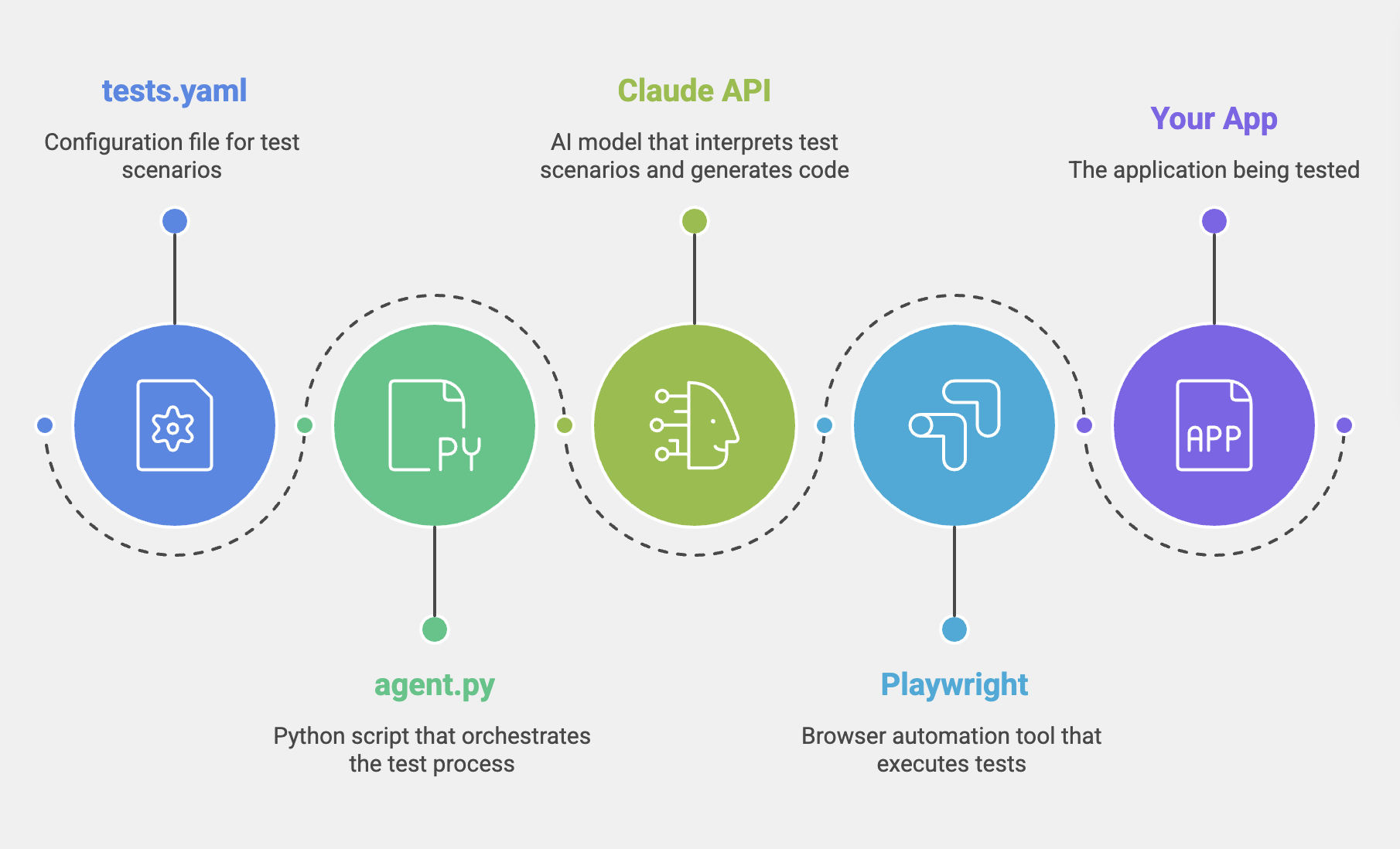
Claude is the reasoning layer. It reads the test spec, decides which tools to call, evaluates page content, and records assertions.
Playwright is the execution layer. It runs a real headless Chromium browser and carries out whatever Claude requests.
agent.py is the bridge. It maintains the conversation history, dispatches tool calls to Playwright, and collects the results.
Setup and Prerequisites
You need Python 3.10+, an Anthropic API key (from console.anthropic.com), and a running application to test against.
pip install anthropic playwright pyyaml
playwright install chromium
Application under test
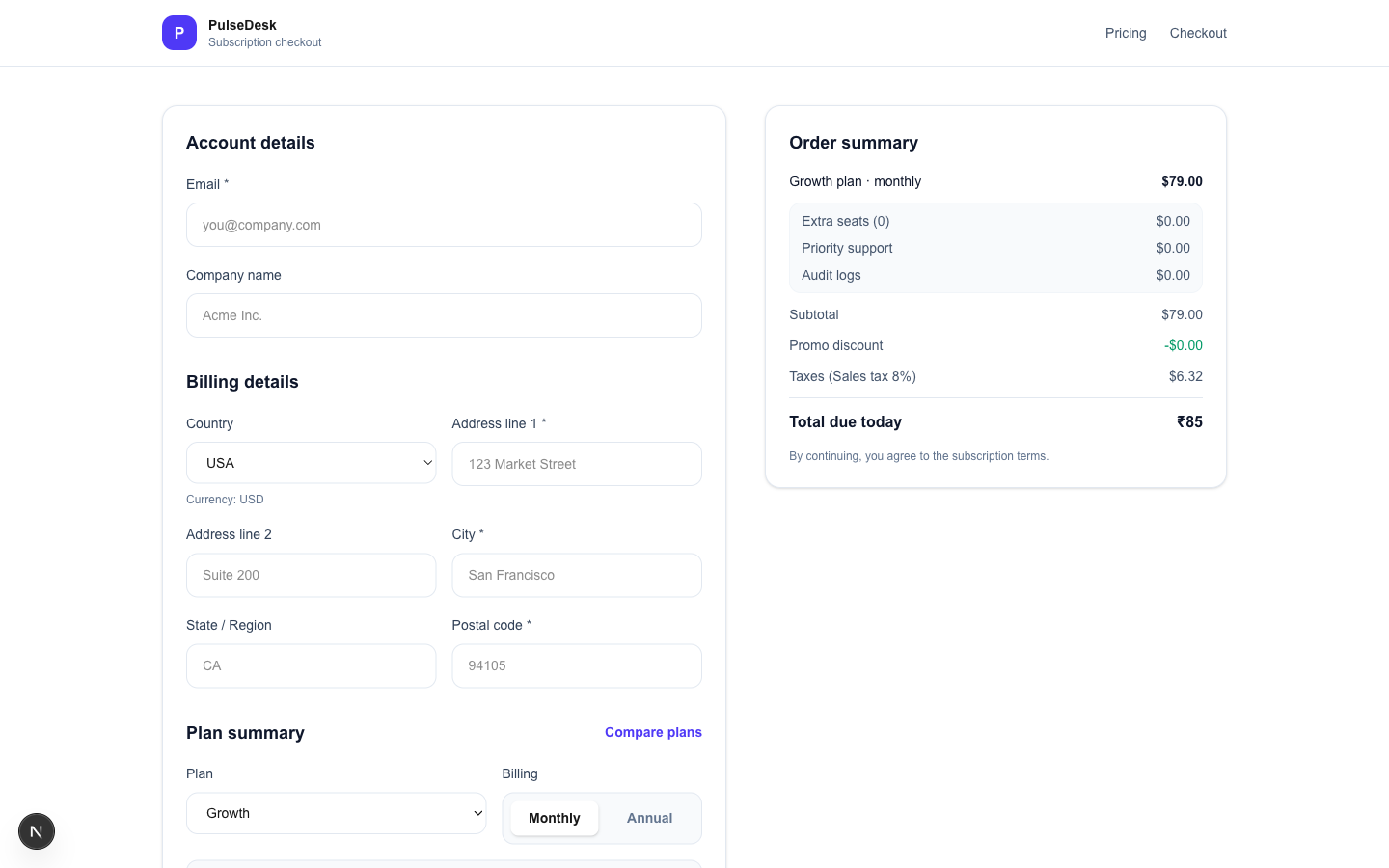
For this example, we will be using a react based checkout app. So there might be many references to checkout specific workflows. You need to modify appropriately based on the application being tested.
A bug was intentionally introduced to understand if and how Claude catches the bug.
Project structure:
your-project/
├── agent.py          # orchestration loop
├── tests.yaml        # plain-English test cases
├── requirements.txt
└── screenshots/      # auto-created on test failures
Getting your API key
Go to console.anthropic.com → Settings → API Keys → Create Key. Add it to GitHub Actions as a repository secret under Settings → Secrets → Actions → New repository secret with the name ANTHROPIC_API_KEY.
Defining Browser Tools
The tool definitions are JSON Schema objects that describe what Claude is permitted to do. Claude never touches the browser directly - it can only request one of these named actions. Think of them as the contract between the AI reasoning layer and the Playwright executor.
TOOLS = [
  {
    "name": "navigate",
    "description": "Go to a URL. Relative paths resolve against the base URL.",
    "input_schema": {
      "type": "object",
      "properties": { "url": { "type": "string" } },
      "required": ["url"]
    }
  },
  {
    "name": "click",
    "description": "Click by CSS selector or visible text label.",
    "input_schema": {
      "type": "object",
      "properties": {
        "selector": { "type": "string" },
        "by_text":  { "type": "boolean", "default": False }
      },
      "required": ["selector"]
    }
  },
  {
    "name": "read_page",
    "description": "Extract all visible text. Pass a CSS selector to narrow scope.",
    "input_schema": {
      "type": "object",
      "properties": { "selector": { "type": "string", "default": "" } }
    }
  },
  {
    "name": "select",
    "description": "Select an option from a dropdown by label text.",
    "input_schema": {
      "type": "object",
      "properties": {
        "selector": { "type": "string" },
        "value":    { "type": "string" },
        "by_label": { "type": "boolean", "default": False }
      },
      "required": ["selector", "value"]
    }
  },
  {
    "name": "assert_pass",
    "description": "Record a passing verification with a descriptive message.",
    "input_schema": {
      "type": "object",
      "properties": { "message": { "type": "string" } },
      "required": ["message"]
    }
  },
  {
    "name": "assert_fail",
    "description": "Record a bug - include expected vs actual in the message.",
    "input_schema": {
      "type": "object",
      "properties": { "message": { "type": "string" } },
      "required": ["message"]
    }
  },
  {
    "name": "finish_test",
    "description": "Mark the test complete. Call this after all steps are executed.",
    "input_schema": {
      "type": "object",
      "properties": { "summary": { "type": "string" } },
      "required": ["summary"]
    }
  }
]
Tool description quality matters
Claude uses the description field to reason about which tool fits each situation. Vague descriptions lead to wrong tool choices. Be specific and action-oriented - describe what the tool does, not what it is.
The Agent Loop
This is the core of the entire system. Each turn: Claude reasons and emits a tool call → Playwright executes it → the result feeds back into the conversation → Claude decides the next step. The full message history is included on every API call so Claude always knows what it has already done.
def run_test(client, executor, test):
    messages = [{
        "role": "user",
        "content": build_prompt(test)
    }]

    for turn in range(MAX_TURNS):
        # 1. Ask Claude what to do next
        response = client.messages.create(
            model="claude-sonnet-4-6",
            max_tokens=4096,
            system=SYSTEM_PROMPT,
            tools=TOOLS,
            messages=messages
        )

        # 2. Record the assistant turn
        messages.append({"role": "assistant", "content": response.content})
        tool_results = []
        finished = False

        for block in response.content:
            if block.type == "tool_use":
                # 3. Execute in the real browser
                output = executor.execute(block.name, block.input)

                # 4. Track assertions
                if output.startswith("ASSERT_FAIL:"):
                    result.failures.append(output)
                if block.name == "finish_test":
                    finished = True

                tool_results.append({
                    "type": "tool_result",
                    "tool_use_id": block.id,
                    "content": output
                })

        # 5. Feed results back so Claude can continue reasoning
        if tool_results:
            messages.append({"role": "user", "content": tool_results})

        if finished or response.stop_reason == "end_turn":
            break

    return result
The key detail: the entire conversation history is sent on every API call. Claude sees every action it took and every result it received. This is how it avoids repeating steps, handles partial failures gracefully, and builds up enough context to make accurate numeric assertions.
Set a MAX_TURNS ceiling Without a turn limit, a confused agent can loop indefinitely and generate significant API costs. 40 turns is a reasonable ceiling for complex multi-step tests. Set it lower for simple validations.
The Browser Executor
The executor translates Claude's tool call inputs into real Playwright actions and returns the results as strings.
class BrowserExecutor:
    def __init__(self, page, base_url):
        self.page = page
        self.base_url = base_url.rstrip("/")

    def execute(self, tool_name, tool_input):
        try:
            return getattr(self, f"_tool_{tool_name}")(tool_input)
        except Exception as e:
            return f"ERROR: {e}"

    def _tool_navigate(self, inp):
        url = inp["url"]
        if url.startswith("/"):
            url = self.base_url + url
        self.page.goto(url, wait_until="networkidle")
        return f"Navigated to {self.page.url}"

    def _tool_click(self, inp):
        if inp.get("by_text"):
            self.page.get_by_text(inp["selector"], exact=False).first.click()
        else:
            self.page.locator(inp["selector"]).first.click()
        self.page.wait_for_timeout(400)
        return f"Clicked '{inp['selector']}'"

    def _tool_read_page(self, inp):
        selector = inp.get("selector", "")
        if selector:
            return self.page.locator(selector).first.inner_text()
        return self.page.locator("body").inner_text()

    def _tool_assert_pass(self, inp):
        return f"ASSERT_PASS: {inp['message']}"

    def _tool_assert_fail(self, inp):
        return f"ASSERT_FAIL: {inp['message']}"

    def _tool_finish_test(self, inp):
        return f"FINISH: {inp['summary']}"
Assertions Without Code
There are no assert statements in the traditional sense. Instead, Claude calls assert_pass or assert_fail when it reaches a conclusion. The orchestrator intercepts these prefixes and routes them into the test result object.
When Claude reads the order summary and sees:
Total due today ₹85
…with the country set to USA and all other lines showing $, it calls:
assert_fail({
  "message": "Total shows ₹85 but country is USA and all other lines show $. "
             "Expected $85.32 (subtotal $79.00 + tax $6.32). "
             "Bug: wrong currency symbol on Total line, and cents are dropped."
})
Claude decides what to verify and whether it passed - based on page content it read via read_page, combined with its own calculations. The agent is the judge, not a hardcoded expected value.
A script asserts a snapshot => it checks that a specific DOM element contains a specific hardcoded value.
The agent asserts an outcome => it reads the live page, reasons about what the values mean, and validates whether the application behaved correctly.
Writing Your Test Cases
Test cases live in a plain YAML file. No special syntax - just steps written the way you would brief a human QA engineer. Actions, observations, and verifications can all coexist in the same step list.
# tests.yaml

- summary: Tax must be computed AFTER discount, not before
  priority: P0
  tags: [tax, discount, math, p0]
  steps:
    - Go to /pricing
    - Select plan -> Starter, Billing -> Monthly
    - Continue to checkout
    - Country -> USA
    - Add Extra seats -> 2
    - Enable Audit logs
    - Apply promo code -> SAVE10
    - Verify tax equals 8% of (subtotal minus discount), NOT 8% of subtotal
    - Verify Total due today equals (subtotal - discount) + tax

- summary: UPI payment must only appear for India
  priority: P1
  tags: [upi, country, conditional-ui]
  steps:
    - Go to /checkout?plan=growth&billing=monthly
    - Country -> India
    - Verify payment method includes UPI
    - Country -> USA
    - Verify UPI option is NOT visible
    - Country -> India
    - Verify UPI option becomes visible again

- summary: FIRSTMONTHFREE promo must become ineligible when switching to Annual billing
  priority: P0
  tags: [promo, billing-toggle, p0]
  steps:
    - Go to /pricing
    - Select plan -> Starter, Billing -> Monthly
    - Continue to checkout
    - Apply promo code -> FIRSTMONTHFREE
    - Verify promo status shows applied and Total reflects discount
    - Switch billing to Annual
    - Verify FIRSTMONTHFREE is marked not eligible for annual plans
    - Verify discount is removed and totals recompute for annual pricing
Steps can be any natural language Actions ("Select plan → Growth"), observations ("Note the Total"), and verifications ("Verify tax equals…") can all appear in the same step list. Claude understands the intent of each step and decides how to execute it. You are not constrained to an imperative format.
Running the Agent
# Run all tests
ANTHROPIC_API_KEY=sk-ant-... python agent.py \
  --tests tests.yaml \
  --base-url http://localhost:3000

# Run only P0 tests (fast CI gate)
python agent.py --tests tests.yaml --tags p0

# Watch the agent work in a visible browser
python agent.py --headed --slow-mo 400
Sample console output:
▶  Running test 1/12: [P0] Tax computed after discount...
   ✅ PASS  (3 checks passed, 0 failures)

▶  Running test 2/12: [P0] Currency switch consistency...
   ❌ FAIL  (5 checks passed, 1 failure)

══════════════════════════════════════════════
  TEST REPORT  -  2026-03-21 14:32:07
══════════════════════════════════════════════

❌  [P0] Currency switch consistency
     ✓  Base price $79.00 confirmed USD
     ✓  Subtotal $79.00 correct
     ✓  Tax $6.32 = 8% of $79.00
     ✗  Total shows ₹85 - expected $85.32
          (wrong currency symbol + missing decimal)

──────────────────────────────────────────────
  TOTAL: 12  |  PASSED: 10  |  FAILED: 2
──────────────────────────────────────────────
A test-results.json file is also produced, containing the full structured output including all individual assertion messages - useful for CI dashboards and PR annotations.
Connecting to GitHub Actions
Because agent.py exits with code 1 on any test failure, GitHub Actions natively marks the job as failed - no extra configuration required.
# .github/workflows/ai-checkout-tests.yml
name: AI Checkout Tests

on:
  pull_request:
    branches: [main]
  workflow_dispatch:
    inputs:
      tags:
        description: "Only run tests with these tags (e.g. p0,currency)"
        required: false
        default: ""

jobs:
  ai-tests:
    runs-on: ubuntu-latest
    timeout-minutes: 45

    steps:
      - uses: actions/checkout@v4

      - uses: actions/setup-python@v5
        with:
          python-version: "3.11"
          cache: pip

      - name: Install dependencies
        run: |
          pip install anthropic playwright pyyaml
          playwright install --with-deps chromium

      - name: Start app
        run: npm ci && npm run build && npm start &
      - run: npx wait-on http://localhost:3000 --timeout 30000

      - name: Run AI tests
        env:
          ANTHROPIC_API_KEY: ${{ secrets.ANTHROPIC_API_KEY }}
          BASE_URL: ${{ vars.BASE_URL || 'http://localhost:3000' }}
        run: |
          TAGS="${{ github.event.inputs.tags }}"
          TAG_ARGS=""
          if [ -n "$TAGS" ]; then
            TAG_ARGS="--tags $(echo $TAGS | tr ',' ' ')"
          fi
          python agent.py --tests tests.yaml --base-url "$BASE_URL" $TAG_ARGS

      - name: Upload results
        if: always()
        uses: actions/upload-artifact@v4
        with:
          name: test-results
          path: |
            test-results.json
            screenshots/
          retention-days: 14
Add ANTHROPIC_API_KEY as a repository secret under Settings → Secrets and variables → Actions.
Build vs. Buy: The Honest Comparison
The agent built in this tutorial is genuinely useful. But, only for very basic use cases. You have to continue to build the toolset for different use cases like iframes, new tab selection, file uploads and downloads, authenticator, SSO, emails and many others. The timeline for the initial framework set up has definitely been reduced, but the maintenance effort and cost is still there. Does your team have the energy, time and cost to maintain a whole other product?
Here is an honest comparison of what you get versus a purpose-built platform like DevAssure's Invisible Agent:
| Capability | Claude Testing Agent (DIY) | DevAssure Invisible QA Agent |
|---|---|---|
| Write tests in plain English | ✅ YAML steps | ✅ Natural language UI |
| Zero-code test authoring | ✅ | ✅ |
| Setup time | ~2-4 hours | ~5 minutes |
| Parallel execution | ❌ Sequential only | ✅ Up to 8 sessions |
| Test Data Set up | ❌ Needs to be coded and requires prompt set up | ✅ Included |
| Self-healing locators | ❌ Must prompt-engineer | ✅ Architectural level |
| CI-CD config | ❌ Not included | ✅ Included |
| Code ownership | ✅ Fully yours | ❌ Vendor-hosted |
| Annual cost (team) | $22k-$45k build | ~$2,400/yr (Growth plan) |
| Ongoing maintenance | ~$3,400-$4,500/yr (15-20% of build) | Vendor-managed |
| Single test execution time (10 steps) | ❌ 5.2 mins => Slow | ✅ 2.1 mins => Faster |
3-year total cost of ownership
At industry-standard engineer rates ($150/hr, North America), reaching feature parity with a managed platform - parallel execution, self-healing, mobile, visual regression costs $22,000-$45,000 in upfront engineering plus $3,000-$4,500/year in maintenance. A managed platform at $2,400/year comes to $7,200 over three years. For most product teams whose core business is not building test infrastructure, the build-vs-buy math is not close.
Building your own agent is the right choice when you have strict data residency requirements, deeply proprietary workflows, or dedicated platform engineering capacity that will own the system long-term. For teams that want intent-driven testing without the infrastructure overhead, a purpose-built platform removes all of it.
What This Approach Changes for Your Team
The practical impact of moving from scripts to intent-driven execution goes beyond tooling.
Test authorship broadens. When writing a test means describing a user goal in plain English rather than 40 lines of Playwright boilerplate, developers write tests. The friction is low enough that quality becomes genuinely embedded in the development workflow.
The maintenance question disappears. Script-based suites require constant locator updates after every UI refactor. An intent-driven agent adapts at runtime. The category of work that consumes 40-50% of test automation budgets is structurally eliminated, not reduced.
CI becomes trustworthy again. When flaky-test noise disappears, engineers stop ignoring CI failures. Quality gates become meaningful. The pipeline is a signal, not a distraction.
The goal was never more test scripts. The goal was confidence that the product works. Intent-driven execution is the architecture that actually achieves it.
Frequently Asked Questions (FAQs)
Conclusion
Test scripts were an excellent solution to a 2010 problem. Applications that deploy continuously, evolve rapidly, and run across diverse environments have outgrown that solution.
The agent built in this article demonstrates that intent-driven execution is not theoretical. You can run it today, against your application, with your existing test cases - rewritten as plain English steps. The infrastructure exists. The Claude API handles the reasoning. Playwright handles the execution.
The only question is how much of your team's time continues to go toward writing and maintaining selectors.
If the answer is "too much," the path forward is clear.
Scriptless. Autonomous. Zero-maintenance testing!!
Meet the Invisible Agent — Write tests in English. Watch them run. Get reports your business understands.
Ready to transform your testing process?
Other Resources
-
Your Team Should Not Be Writing Test Scripts. Here's Why - and What to Do Instead
-
Why IT Startups in the USA Are Using AI to Reduce QA Costs by 50%
-
AI-Agentic Test Automation Platform for the US Tech Ecosystem
-
Still Hiring a Manual QA Engineer in 2026? Salary, Cost, and Clever Alternatives
-
Automation Framework vs Automation Tool - What the American Tech Industry Needs in 2026