No-Code vs Low-Code Test Automation - What Modern QA Teams Need

“The best way to predict the future is to invent it.” — Alan Kay, Computer Scientist and Pioneer of Object-Oriented Programming
Test automation was meant to give QA teams that power. Build the right tests once, and the future looks predictable.
Yet in real-world QA pipelines, things rarely stay predictable for long. UI changes break tests overnight. Framework updates introduce flakiness. And suddenly, teams are debating tools instead of shipping features.
This is where the no-code versus low-code conversation usually starts. One promises speed without complexity. The other promises control without chaos.
But the real problem is not choosing between two categories. It is choosing an automation approach that survives product changes, team growth, and release pressure. That is the gap most teams feel but struggle to name. And it is exactly what this article helps you reason through.
What Is No-Code Test Automation?
In most QA teams, no-code test automation simply means you can automate tests without sitting down to write scripts. You build tests visually, using actions like clicks, inputs, and checks that look a lot like the steps you already follow manually.
Instead of coding, you work through a UI. The tool handles the automation logic in the background.
How It Works
Most no-code tools follow a visual, action-based approach.
- Recording real user actions on the application
- Assembling test flows using drag-and-drop steps
- Using prebuilt actions for common UI elements
- Adding basic validations through the interface
You focus on the flow. The tool takes care of turning it into automation.
Who It’s Built For
No-code automation works best for teams that want to move fast without deep scripting.
- Manual testers starting their automation journey
- QA team members without a coding background
- Product or QA teams running simple, repeatable regression checks
Where No-Code Shines
This approach is most effective when speed and simplicity matter.
- Quick onboarding for new QA team members
- Minimal setup and learning effort
- Fast coverage for stable, linear user flows
Related Reading: Is No-Code Really the Future of Test Automation?
What Is Low-Code Test Automation?
Low-code tools give teams a visual foundation, with room to go deeper.
- Visual test builders for common flows
- Reusable components and parameterized steps
- Scripting support for complex logic and edge cases
- Access to APIs, data layers, and test hooks
You do not need to write code for everything. But when things get tricky, you are not blocked by the tool.
Who It’s Built For
Low-code automation suits teams that want speed without giving up flexibility.
- QA teams with a mix of manual testers and automation engineers
- Developers contributing to test automation
- Teams working with complex workflows or frequent releases
Where Low-Code Shines
This approach becomes valuable as products and teams grow.
- Better control over test logic and data handling
- Easier maintenance as applications evolve
- Stronger fit for CI/CD pipelines and scaling test suites
Related Reading: Introducing DevAssure | Low code Test Automation Platform
No-Code vs Low-Code Test Automation: What’s the Real Difference?
Here’s a side-by-side comparison to highlight the differences between no-code and low-code test automation:
| Aspect | No-Code Test Automation | Low-Code Test Automation |
|---|---|---|
| Learning Curve | Very quick to pick up. Most testers can start automating within hours. | Slightly higher. Requires basic understanding of logic or scripting concepts. |
| Flexibility | Best for linear, predictable test flows with limited variation. | Handles conditional logic, dynamic data, and complex workflows more easily. |
| Maintenance Effort | Easy to create tests, but fixing them at scale can become manual and repetitive. | More effort upfront, but easier to refactor and maintain as the product evolves. |
| Scalability | Scales in number of tests, but struggles as complexity grows. | Scales well with larger applications and long-term automation needs. |
| Debugging Depth | Mostly visual debugging. You see failures, but root causes can be hard to trace. | Deeper debugging through logs, conditions, and code-level visibility. |
| CI/CD Integration Readiness | Can run in pipelines, but customization and control are often limited. | Designed to fit naturally into CI/CD workflows with better execution control. |
Related Reading: Test automation tools used by modern QA teams
Why This Choice Matters for Modern QA Teams
- It directly impacts release speed: The wrong automation approach can slow pipelines with flaky tests, reruns, and last-minute fixes.
- It shapes how QA and developers collaborate: Some approaches keep automation siloed, while others make shared ownership easier when things break.
- It affects test reliability, not just coverage: High test counts mean little if teams stop trusting the results.
- It determines how well automation scales: As products grow more complex, automation either adapts or becomes technical debt.
- It influences team morale over time: Constantly fixing fragile tests drains energy and focus.
- It decides whether QA supports delivery or blocks it: When automation fits the team, it accelerates work. When it doesn’t, it becomes another problem to manage.
This is exactly where a purpose-built low-code testing platform like DevAssure can make a difference. DevAssure blends the simplicity of drag-and-drop test creation with the power of scriptable logic, helping teams automate both UI and API tests without forcing a full commitment to heavy code or rigid no-code flows.
Unlike standalone visual recorders, DevAssure unifies end-to-end test automation, parallel execution, and CI/CD readiness under one roof, making it easier to scale automation as your product grows.
🚀 See how DevAssure accelerates test automation, improves coverage, and reduces QA effort.
Ready to transform your testing process?
How No-Code and Low-Code Test Automation Work in Practice
| Stage | No-Code Test Automation | Low-Code Test Automation |
|---|---|---|
| Test Setup | Select a test scenario and work directly on the UI. | Start by designing reusable test components or flows. |
| Test Creation | Record actions or define steps visually through the interface. | Combine visual steps with logic where needed. |
| Validations | Add basic checks like element presence or text validation. | Add validations using parameters, conditions, and custom logic. |
| Data Handling | Mostly static or fixed test data. | Parameterized data that adapts to multiple scenarios. |
| Execution | Run tests manually or on a schedule. | Run tests as part of CI/CD pipelines and automated workflows. |
| Failure Handling | Failures are fixed manually by updating visual steps. | Failures are debugged using logs, conditions, and code-level insights. |
| Extending Tests | Limited to what the tool’s UI allows. | Tests can be extended or modified through code when required. |
Benefits of No-Code Test Automation
No-code test automation helps teams get started quickly, especially when the goal is early coverage rather than long-term optimization.
- Faster adoption across QA teams with minimal onboarding effort
- Enables manual testers to automate without relying on developers
- Lower initial setup and learning cost
- Suitable for stable, linear UI flows that change infrequently
- Useful for quick regression coverage when speed matters more than flexibility
Challenges and Limitations of No-Code Automation
The limitations usually show up gradually. Not immediately.
- Customization options are limited
- Dynamic UI changes are harder to handle
- Debugging often lacks depth
- Maintenance becomes manual as tests grow
Benefits of Low-Code Test Automation
Low-code test automation is designed for teams that want speed without losing control as their test suite and product grow.
- Balances visual test creation with the ability to add logic when needed
- Handles complex workflows, conditions, and data-driven scenarios more naturally
- Easier to maintain as applications evolve and UI changes become frequent
- Scales well for growing test suites and larger QA teams
- Works smoothly with CI/CD pipelines and automated release workflows
- Encourages collaboration between QA engineers and developers
Challenges and Trade-Offs of Low-Code Automation
Low-code is not friction-free. It asks a bit more from the team.
- Learning curve is slightly higher
- Requires comfort with basic coding concepts
- Initial setup effort is greater
Which Approach Works Better for Your QA Team?
There’s no universal “better” choice. The right approach depends on how your team tests today and how fast your product is changing.
Instead of starting with tools, start with context. Team makeup, release cadence, and test complexity matter more than feature lists.
Choose No-Code Test Automation If
- Most tests follow predictable, linear UI paths
- Your QA team is largely manual today
- You need quick coverage with minimal learning overhead
- Speed matters more than long-term optimization right now
No-code works well as an entry point. It helps teams get automation running without waiting on new skills or frameworks.
Choose Low-Code Test Automation If
- Your product changes frequently and UI behavior varies
- Tests depend on data, conditions, or reusable logic
- Developers contribute to automation, or testers are open to basic scripting
- Maintainability matters as much as coverage
Low-code offers more control without forcing everything into code. It reduces rework as complexity increases.
What Most Teams End Up Doing
Most teams don’t stick to one approach forever. They evolve. No-code often works early on. Low-code becomes necessary as automation matures. The mistake is treating this as a one-time decision instead of something that grows with the product.
If you are actively comparing platforms rather than just approaches, this guide on choosing the best test automation platform breaks down what matters beyond feature checklists.
Best Practices for Choosing the Right Test Automation Approach
These best practices help teams avoid short-term wins that turn into long-term maintenance problems.
Test automation best practices cycle
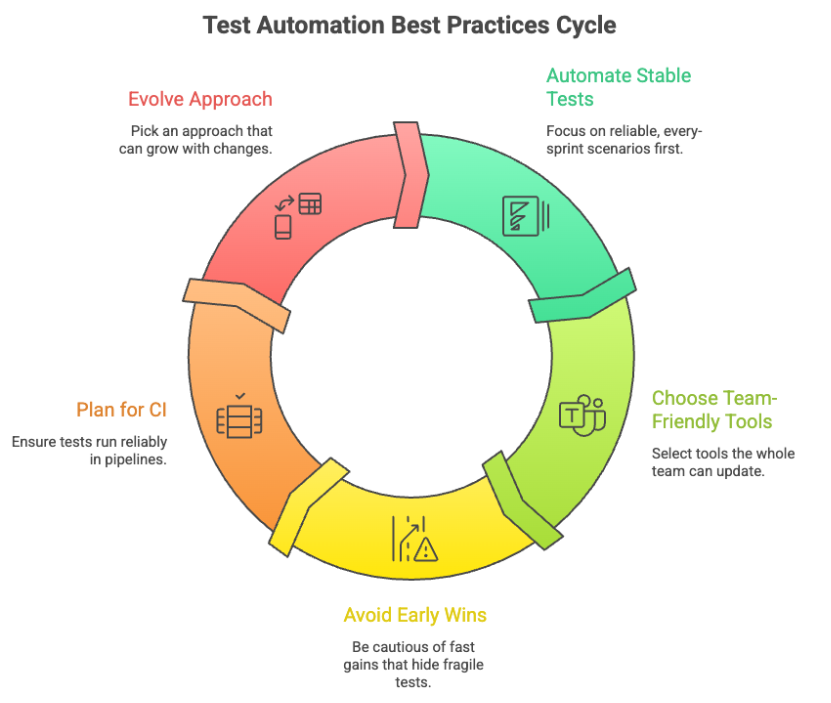
- Start with the tests you already run: Focus on the test cases executed every sprint, not future plans.
- Think about who fixes broken tests: Automation will break.
- Be cautious with early wins: Fast progress in the first few weeks can hide future costs.
- Plan for CI sooner than later: Tests eventually run in pipelines, where limitations become obvious.
- Leave room to evolve: QA setups rarely stay static. Teams grow, products change, and expectations rise.
Common Myths About No-Code and Low-Code Automation
Myth 1: No-Code Means Zero Maintenance
No-code tests still need care. As applications change, tests need updates, just like any other automation.
Myth 2: Low-Code Is Basically Full Coding
Low-code does not mean writing everything from scratch. It simply gives teams the option to add logic when visual steps are not enough.
Myth 3: One Approach Can Handle Every Test Case
No single approach fits every scenario. Simple UI flows and complex workflows often need different levels of control.
Myth 4: Switching Later Is Always Easy
Migration is possible, but it is rarely effortless. Choosing with future growth in mind reduces rework.
Myth 5: More Automation Automatically Means Better Quality
Automation helps only when tests are reliable and meaningful. Flaky tests create noise, not confidence.
Where DevAssure Fits Into This Picture
Most QA teams do not struggle because they lack tools. They struggle because their automation approach stops fitting once products and teams grow.
DevAssure follows a low-code approach that lets teams start visually, without locking them into rigid workflows.
In practice, teams usually see value in a few specific areas:
- Visual test creation that works for testers without forcing everything into scripts
- The ability to add logic, data handling, or extensions when test scenarios grow
- Support for both UI and API testing within the same workflow
- Better alignment with CI pipelines as automation matures
This balance matters when teams are moving beyond basic no-code setups.
How to Make the Right Choice for Your QA Team
If you strip away the labels, this comes down to how your team works today. And how much change your automation setup can handle without becoming a burden.
A good way to sanity-check the decision is simple.
If you had to maintain the same tests six months from now, would this approach still feel manageable?
When the answer is yes, automation starts working with the team instead of against it.
If you want to see how a low-code approach like DevAssure fits into real QA workflows, you can schedule a short demo and evaluate it using your own test scenarios.
🚀 See how DevAssure accelerates test automation, improves coverage, and reduces QA effort.
Ready to transform your testing process?