Top 7 Low-Code Test Automation Tools in 2025

“If you’re not automating, you’re falling behind.” — Elon Musk, Founder, CEO & Chief Engineer of SpaceX, CEO of Tesla, Inc.
You don’t have to build rockets for a living to relate to that. Anyone in QA or product engineering right now can feel the pinch — shorter sprints, shifting priorities, and a codebase that seems to change its mind every other day.
If your automation relies on scripts that fail whenever the UI shifts, the difference between finishing work and being ready to ship becomes obvious.
Low-code tools took off because they remove a lot of the repetitive work. You don’t have to spend half a day fixing locators or writing basic Selenium steps. You build the flow visually and let the AI handle the small stuff. It’s simply a faster way to match the speed of modern development.
In this guide, we will walk you through what low-code test automation really is (beyond the buzzword), the features that actually matter when you’re choosing a platform, and a closer look at the top seven low-code automation tools worth considering in 2025.
What Is a Low-Code Test Automation Platform?
At its core, a low-code test automation platform is just a simpler way to build automated tests without living inside code editors all day. Instead of typing out long Selenium or Appium scripts, you piece things together with visual steps or small building blocks.
Most tools quietly handle the repetitive, mechanical bits for you — which means you get the benefits of automation without needing every tester to think like a full-time developer.
Most low-code platforms usually come with things like:
Low-code workflow at a glance
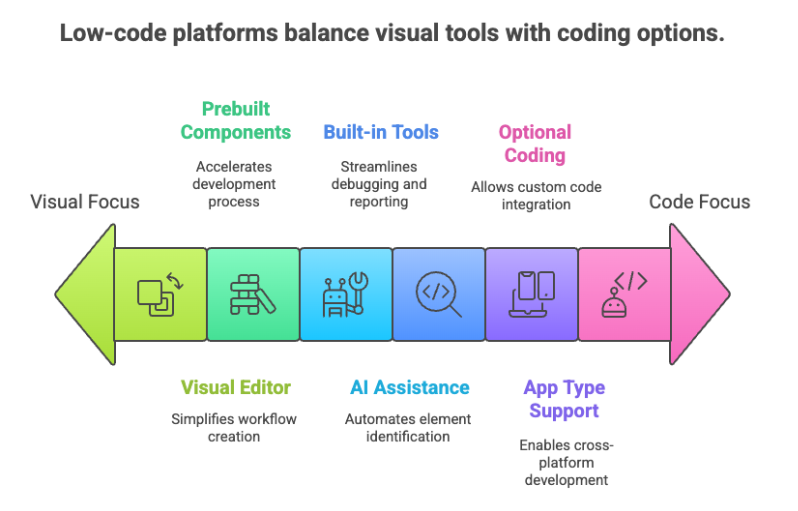
- A visual editor where you can drag steps around instead of writing them
- Prebuilt components you can reuse for common actions
- AI that helps spot elements and fix broken locators on its own
- Built-in reports and debugging tools so you’re not hunting for logs
- Support for different app types — web, mobile, APIs, and sometimes desktop
- The option to write code only when you need something more advanced
Related Reading: Leveraging AI in Test Automation
Key Features to Compare Before Choosing a Tool
Before settling on any low-code platform, it helps to look at the things that actually affect your day-to-day work. Here are the things worth checking, without overthinking it:
- How easy it is to build tests: If your team needs a full training session just to add a login flow, that’s a red flag. The whole point of low-code is to speed things up.
- AI support: Some tools handle locator changes quietly in the background; others just break and leave you guessing. Go for the one that saves you time, not creates more work.
- Maintenance load: Ask yourself, “Will this survive two UI updates?” A good platform should handle minor changes without melting down.
- What platforms it actually covers: It’s great if a tool can automate everything under the sun, but check whether it supports the apps you use daily — web, mobile, APIs, maybe desktop.
- CI/CD friendliness: If you have to hack your way through pipeline integration, it defeats the purpose. It should plug into Jenkins, GitHub Actions, Azure DevOps, etc., without drama.
- Scalability: This matters once your suite grows. Parallel runs, cloud execution, or access to device/browser grids can shave hours off regression time.
- Pricing transparency: Pricing becomes a real factor once more people start using the tool or your test runs increase. Clear, predictable pricing helps you avoid surprises later.
Related Reading: Best Test Automation Tools
The Top 7 Low-Code Test Automation Platforms in 2025
Choosing a low-code platform in 2025 feels a bit like choosing a long-term teammate. Here’s a closer, human look at seven platforms teams are leaning toward this year.
1. DevAssure
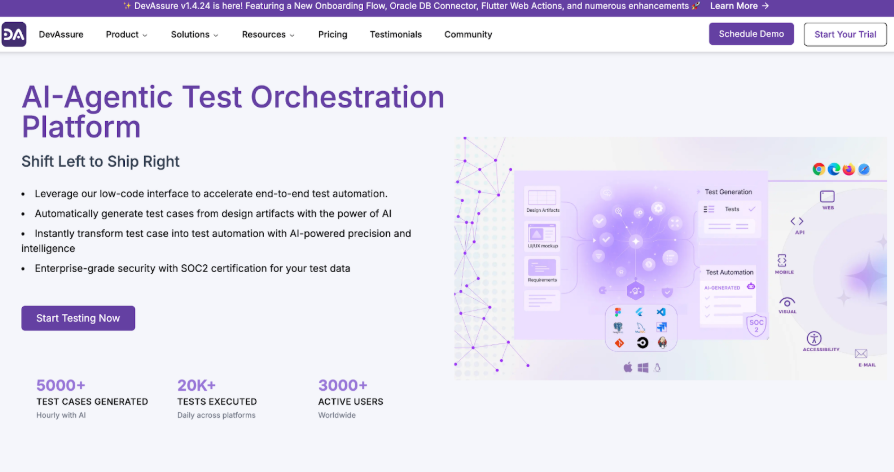
DevAssure is built for teams who want speed, visibility, and AI support that fits naturally into the workflow instead of taking over everything. The first thing people usually notice is how clean the UI feels and how quickly they can build tests without getting stuck in setup steps.
What really sets DevAssure apart is how it blends low-code simplicity with developer-friendly depth. The AI assistance is also practical — suggestions pop up right when you need them, and debugging doesn’t feel like detective work because everything is laid out cleanly.
Another thing teams appreciate is how DevAssure treats API testing and UI testing as part of the same story, not two separate worlds. And the reporting? It’s the kind you can confidently show your PM without needing a 10-minute explanation. Overall, it’s a platform that respects both testers and developers, which isn’t as common as it should be.
Why teams gravitate toward DevAssure:
- Smooth low-code workflows that feel natural, not restrictive
- AI support that helps with real-world tasks: test generation, suggestions, and better visibility
- Clear, detailed debugging so you don’t lose time figuring out what broke
- Built with a modern developer mindset — powerful, but easy for testers to adopt
- Straightforward onboarding, even for teams new to automation
- Strong focus on accuracy and stable execution
2. ACCELQ
ACCELQ is an AI-powered, codeless cloud platform for web, mobile, API, and desktop testing, designed to be a full quality lifecycle automation solution rather than just a test runner. It is widely covered in enterprise testing blogs as a leading no-code option for complex, end-to-end scenarios across modern and legacy stacks.
Commonly emphasized strengths:
- Design-first, business-process modeling with a codeless logic editor, enabling non-coders to automate complex workflows while preserving traceability to requirements.
- AI-driven capabilities such as smart element handling, autonomics-based automation, and “Autopilot” for intelligent test generation and maintenance at scale.
- Deep ecosystem fit: cross-platform coverage, cloud or on-prem labs, tight CI/CD and DevOps integrations, and strong reporting for enterprise QA teams.
3. Katalon Platform
Katalon Platform is an AI-augmented, low-code test automation suite that unifies web, mobile, API, and desktop testing with built-in analytics, cloud execution, and enterprise reporting. It is often described in SaaS comparisons as a “practical middle ground” between pure codeless tools and full-code frameworks.
Highlights typically called out:
- Low-code test creation via recorder, keywords, and object repository, with the option to drop into full code and custom keywords when needed.
- Integrated platform components: Studio (authoring), Runtime Engine (CLI/CI), TestCloud (on-demand environments), and TestOps (reporting and analytics) under one license.
- AI features like self-healing locators, smart waits, visual testing, and TrueTest-style user journey discovery to keep tests stable as applications evolve.
4. Leapwork
Leapwork is a no-code automation platform built around flowchart-style visual design, aimed at enabling business and QA users to automate end-to-end tests without scripting. SaaS-style reviews frequently frame it as ideal for enterprises with complex desktop/SAP/virtualized systems and non-developer testers.
Key themes in mature reviews:
- Visual flow-based modeling with reusable sub-flows, parameterization, and version control, making it easy to standardize patterns like login or navigation across suites.
- Broad tech coverage including web, desktop, SAP, APIs, and Citrix/virtual apps, with AI-powered smart recorder and strong debugging (video recordings, step-level insights).
- Low learning curve for manual testers and business users, plus enterprise-grade compliance, collaboration, and integrations into existing SDLC tooling.
5. Ranorex Studio
Ranorex Studio is a commercial GUI test automation suite that blends codeless recording with powerful object recognition for desktop, web, and mobile applications. It tends to feature in comparisons as a strong choice for teams with rich desktop or legacy interfaces that typical web-only low-code tools struggle with.
Commonly cited characteristics:
- Robust record-and-playback with an object repository and UI element inspection tailored to complex desktop UIs, plus support for web and mobile.
- Codeless test creation with the option to extend in code, offering flexibility for advanced logic while keeping routine scenarios accessible.
- Detailed reporting, screenshot/video capture, and integrations with CI tools and other testing solutions for end-to-end visibility.
6. Aqua (aqua / AquaALM)
Aqua is a test management and low-code automation platform that combines requirements, manual tests, and automation control in one ALM-style environment. It is often described as the “control center” layer in tool comparison articles, orchestrating multiple automation engines.
Typical blog-style talking points:
- Centralized management of test cases, requirements, defects, and automation runs, aimed at regulated or large organizations needing governance.
- Low-code and AI-assisted capabilities to generate test assets, manage data, and connect to various automation tools like Selenium, Ranorex, or others.
- Rich reporting and traceability, making it easier to audit coverage and quality across projects and teams.
7. KaneAI by LambdaTest
KaneAI is LambdaTest’s GenAI-native test agent, offered as a QA-as-a-Service platform that lets teams plan, author, debug, and evolve tests entirely in natural language. It is widely positioned in blogs as a leading “agentic AI” tool for high-velocity quality engineering teams.
Key points that high-quality SaaS posts emphasize:
- Natural-language test authoring where users describe objectives and flows; KaneAI generates, updates, and debugs the underlying automated tests.
- Deep integration with the LambdaTest cloud (browsers, OSs, real devices, HyperExecute) plus collaboration hooks via Slack, Jira, and GitHub.
- Advanced AI features like 2-way test editing (NL ↔ code), automatic bug identification during runs, and versioned test management for enterprise-grade workflows.
Conclusion
Choosing a low-code platform is about finding something your team won’t fight with three months from now. All seven tools on this list are solid in their own ways, and you wouldn’t really “go wrong” with any of them.
But if you’re looking for something that feels modern, quick to learn, and actually helpful when you’re deep in sprint chaos, DevAssure is the one that usually clicks fastest.
It gives you the clarity of low-code, the speed of AI, and the kind of test visibility that makes troubleshooting feel less like detective work. If your goal is to cut down automation time and get more predictable releases without increasing headcount, DevAssure is probably the easiest “yes.”
At the end of the day, go with the tool that makes your work feel lighter, not heavier.
🚀 See how DevAssure accelerates test automation, improves coverage, and reduces QA effort.
Ready to transform your testing process?