Using Claude to Build a Testing Agent is Brilliant - Until It Isn't

If you have been paying attention to Anthropic's tooling ecosystem over the last 12 months, Claude's web testing capabilities are genuinely exciting. The Computer Use API, the Claude in Chrome extension, and Claude Code's browser integration represent a real shift in what an AI model can do inside a browser - and the instinct to build a testing layer on top of it is completely rational.
This blog is written for engineering managers, CTOs, and developers who are either already experimenting with Claude for testing or are evaluating it as an option.
We are going to do 3 things:
- Document what Claude genuinely enables,
- Trace exactly where the DIY path gets expensive, and
- Make an objective case for when a purpose-built platform like DevAssure is the right call instead.
What Claude Gets Right
Claude's browser capabilities have evolved substantially. There are now 3 distinct modes a team can use for web testing with Claude - and each one is genuinely capable for certain use cases.
Claude in Chrome Extension
Launched as a research preview in August 2025, Claude in Chrome lets you instruct Claude to act inside your actual Chrome browser - complete with your login sessions, cookies, and extensions already active. For a developer who just pushed a new signup flow and wants to test it against a staging environment they're already signed into, this is fast and natural. You describe the test in plain English, Claude executes it, and you get a report back.
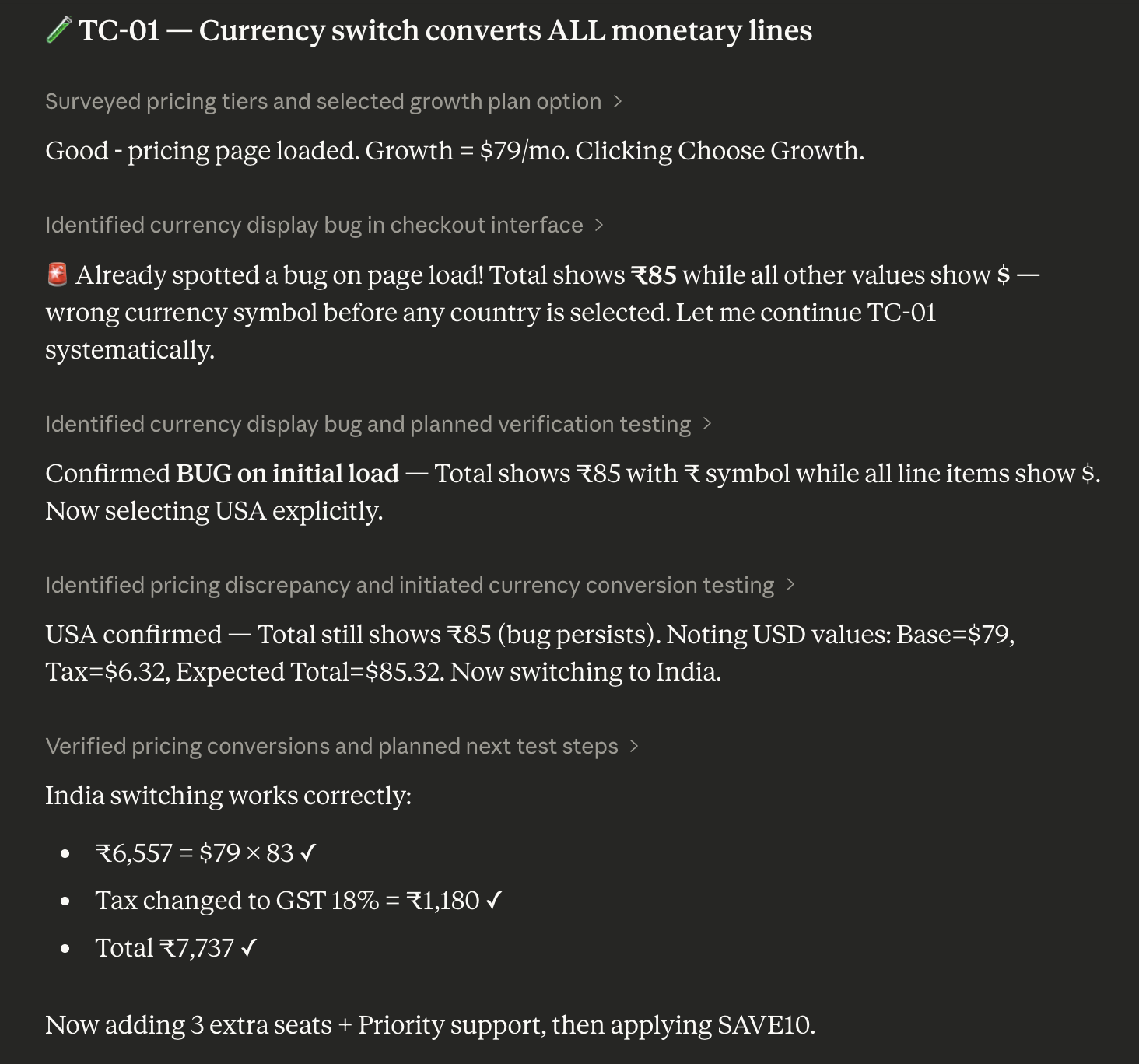
Claude Code + Browser Integration
Claude Code's browser integration via the Claude in Chrome extension brings testing into the terminal-based development loop. The developer workflow looks like this:
- write the feature in the terminal,
- run a test prompt like "test the new checkout flow and report any validation errors,"
- Claude navigates, fills forms, and
- reports back - all while you stay in your terminal context.
For teams that already live in Claude Code, this is a meaningful quality of life improvement.
Claude Computer Use API
The Computer Use API is the most powerful option for custom automation. Via the API, Claude can take screenshots, click, type, scroll, and navigate - enabling programmatic browser control from any environment. A team with strong Python skills can wire this into a test harness and get genuinely capable AI-driven E2E tests.
Claude understands natural language test descriptions without selectors, adapts contextually to unexpected UI states, leverages vision to "see" the page rather than relying on fragile CSS or XPath selectors, and can generate detailed narrative reports of what it did and found. These are real capabilities that conventional Playwright or Selenium scripts cannot replicate.
A real example: setting up a local test with Claude Code
Here is what a developer experience looks like when Claude Code's browser integration is working well - this is impressive:
# One-time setup: install the Claude in Chrome extension,
# enable it in Claude Code, link to your workspace

claude --chrome

# Then describe tests in plain English:
"Test the user registration flow on localhost:3000.
 Verify the form validates empty fields, check that a
 valid signup creates a session, and confirm the
 welcome email confirmation appears."

# Claude navigates, fills forms, checks validation states,
# takes screenshots, and returns a structured report.
No test framework configuration. No selector maintenance. No Playwright boilerplate. For a developer doing exploratory validation after a feature commit, this is an excellent workflow.
The Setup - Reality Check
Here is where the honest analysis starts. The Claude-for-testing workflow is impressive in demos and developer-mode usage. The experience changes substantially when you try to turn it into a repeatable, team-owned, production-grade test system.
Local setup: what you actually need to build
Claude in Chrome works out of the box for local use - but it is a single-user, single-browser workflow. To make it useful for a team:
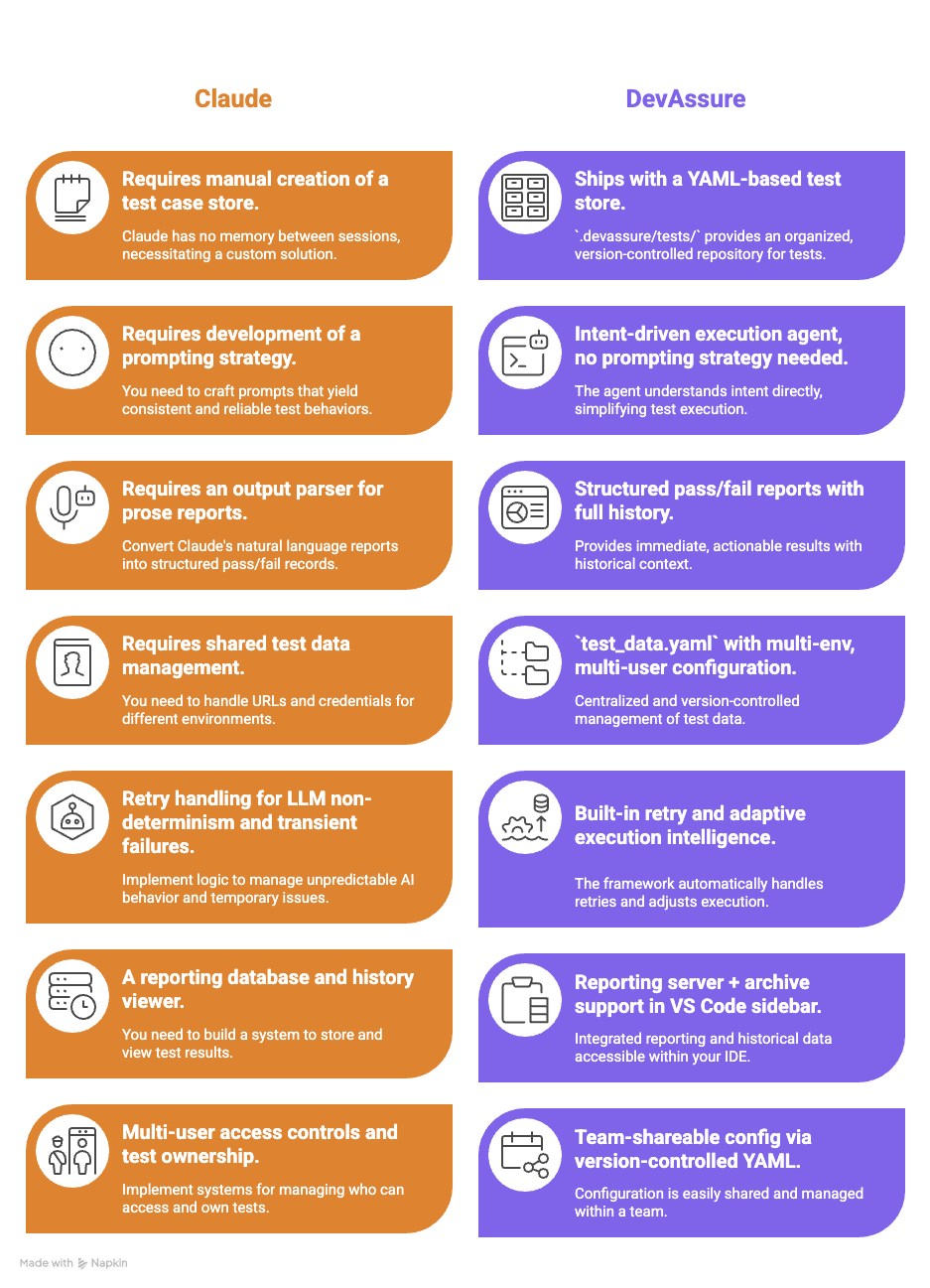
DevAssure's setup for local use takes minutes. After installing the VS Code extension, you initialize a project with your app URL, description, and personas - and the extension creates the full .devassure/ folder structure with a sample test. Writing a test looks like this:
summary: User registration flow
steps:
  - Open the application URL
  - Click the Sign Up button
  - Enter a valid email and strong password
  - Submit the form
  - Verify the confirmation screen appears
  - Verify no error messages are shown
priority: P0
tags:
  - registration
  - sanity
A non-engineer can write that. A product manager can review it. It version-controls with your codebase. There is no equivalent in a Claude-only setup.
The CI/CD Pipeline Problem
This is where the Claude approach has a hard technical blocker that is not a matter of preference - it is a structural limitation of how the product is built today.
Claude in Chrome: a CI/CD hard stop
Claude in Chrome requires a visible, signed-in Chrome window. It uses your actual browser profile - cookies, login state, extensions. That is also what makes it good for local use. But CI/CD environments (GitHub Actions, GitLab CI, Jenkins, CircleCI) run headlessly, without a display, without a user-owned browser profile. The Chrome extension architecture is fundamentally incompatible with headless execution.
Headless operation is not supported by the Claude in Chrome extension. The extension requires a signed-in Chrome browser profile and an active display. Running it in CI requires a virtual display (Xvfb) and additional infrastructure configuration, and even then, the session state management is fragile. This is not an edge case - it is the default CI/CD reality for most teams.
Teams that try to work around this typically end up building a virtual display layer using Xvfb, Docker containers with a headed Chrome instance, and SSH tunneling for profile state management - engineering work that adds $1,800-$4,800/year in infrastructure cost and ongoing maintenance.
Claude Computer Use API: possible but complex
The Computer Use API can run in CI, but it requires
- Building an agent loop that orchestrates between your CI system, the API, and a headless browser environment.
- Building tools for managing screenshots.
- Building tools for translating API responses into browser actions.
- Handling authentication state.
- Managing timeouts
- Logging results
- Finally wiring all of it to your CI pipeline's pass/fail signals.
This is a non-trivial engineering project.
# GitHub Actions - conceptual Claude Computer Use setup
# (Does NOT work with Claude in Chrome; only Computer Use API)

jobs:
  ai-test:
    runs-on: ubuntu-latest
    steps:
      # 1. Start a virtual display for headed Chrome
      - run: Xvfb :99 & export DISPLAY=:99
      # 2. Launch Chrome with remote debugging
      - run: google-chrome --remote-debugging-port=9222 &
      # 3. Run your custom Python orchestration script that:
      #    - Reads test cases from wherever you stored them
      #    - Calls Claude Computer Use API for each step
      #    - Takes + passes screenshots to Claude
      #    - Parses Claude's action responses
      #    - Executes browser actions via CDP
      #    - Records pass/fail and screenshots
      #    - Generates a report you can read
      - run: python your_custom_agent.py
      # Estimated build time: 6-12 engineer weeks
DevAssure: CI/CD in three steps
DevAssure's CLI was built for CI/CD from the ground up. Headless execution is the default. Authentication uses a token you generate from the dashboard. The entire CI integration looks like this:
jobs:
  qa-tests:
    runs-on: ubuntu-latest
    steps:
      - uses: actions/checkout@v4

      - name: Install DevAssure CLI
        run: npm install -g @devassure/cli

      - name: Authenticate
        run: devassure add-token ${{ secrets.DEVASSURE_TOKEN }}

      - name: Run test suite
        run: devassure run-tests --filter "tag=sanity && priority=P0"

      # Reports, history, and archives are handled automatically.
      # No Xvfb. No headed browser. No custom orchestration.
The .devassure/preferences.yaml file sets headless: true and workers: 4 for parallel execution - and that same configuration works identically in local and CI environments. There is no divergence between how your tests run on a developer's machine and how they run in the pipeline.
Efficiency and Cost - The Real Numbers
Here is where the engineering manager's spreadsheet needs to tell the whole truth. Both approaches have real costs; the question is which costs are visible upfront and which ones compound invisibly.
Engineer time to reach a working test suite
| Activity | Claude (DIY) | DevAssure |
|---|---|---|
| Initial framework setup and CI integration | 8-16 weeks (SDET) | 1-2 days (any engineer) |
| Writing first 50 test cases | ~2 weeks (prompt engineering required) | ~2-3 days (YAML + plain English) |
| Onboarding a QA analyst (non-coder) | Not feasible without Python skills | Same day - YAML is readable/writable by all |
| Adapting to a UI redesign (20% of flows change) | Manual prompt review + re-validation required | Agent adapts automatically |
| Expanding to API testing | Separate build project | Built-in feature |
| Expanding to mobile testing | Separate build project (Claude has no mobile support) | Built-in feature |
The LLM API cost meter
When you build on Claude's Computer Use API, every test step makes an API call. The token consumption compounds quickly - vision models are expensive, DOM state context is large, and multi-step tests burn tokens at each decision point.
A typical E2E test flow involves 8-15 LLM decision steps.
Each step passes a screenshot (~2,000 vision tokens) + DOM context (~8,000 tokens) + prior action state (~5,000 tokens) = ~15,000 tokens per step.
At 10 steps per test x 100 tests/day x 250 working days: ~ 375M tokens/year. At Claude Sonnet 4 pricing (~$3/MTok input, $15/MTok output), that is approximately $2,250-$3,300/month in pure API costs.
Scale to 500 tests/day and you are at $11,000-$16,500/month - before a single dollar of engineering or infrastructure cost.
Year 1 total cost of ownership
| Cost Category | Claude DIY | DevAssure |
|---|---|---|
| Framework build time (SDET @ $120K/yr fully-loaded ¹) | $36,400-$52,000 | $0 |
| Claude subscription or API costs (year 1) | $27,000-$39,600 | Not applicable |
| CI/CD infrastructure (headed browser, virtual display) | $1,800-$4,800 | $0 (headless native) |
| Annual maintenance (30-40% of build cost) ² | $10,920-$20,800 | Included in subscription |
| Prompt engineering + LLM cost optimization | $5,000-$15,000 | $0 |
| Recruitment overhead (if new SDET needed) ³ | $8,000-$15,000 | $0 |
| Year 1 Total Cost of Ownership | $89,120-$147,200 | Platform subscription only |
Maintenance: the compounding cost
Capgemini's World Quality Report documents that teams running active UI automation spend 30-40% of their QA engineering capacity on maintenance - keeping tests from breaking as the UI evolves. In a DIY Claude setup, every UI change can require manual prompt review, re-validation of expected outputs, and regression checking against Claude's output format. Industry data shows automation teams spend at minimum 8 hours per week on test maintenance alone - equivalent to creating two new tests from scratch each week, indefinitely.
DevAssure's adaptive execution intelligence is specifically designed to absorb this cost. The agent adapts to UI and flow changes automatically, so a CSS class rename or a button repositioning does not trigger a maintenance sprint. For teams with frequent UI iteration cycles, this single capability can reclaim 0.5-1 full FTE equivalent in engineering time annually.
Honest Pros and Cons
Claude - Pros
- Best-in-class contextual reasoning for exploratory testing
- No framework setup for local, developer-mode use
- Excellent for validating new features during active development
- Seamlessly integrates with Claude Code for in-terminal validation
- Vision-based - not dependent on fragile CSS selectors
- Deeply customizable for bespoke automation workflows
Claude - Cons
- No persistent test store - zero memory between sessions
- Chrome extension requires a headed browser - CI/CD blocked ⁴
- No native CI/CD integration path without significant custom engineering
- Per-step LLM API costs escalate sharply at scale
- Prompt injection attack surface (11.2% success rate with mitigations ⁵)
- No API, mobile, visual, or accessibility testing coverage
- Requires SDET-level skills to build a production test system
- Framework tied to model versions - deprecation risk
- No test management, filtering, history, or reporting out of the box
DevAssure - Pros
- CI/CD native - headless by default, three-step pipeline integration
- YAML test cases writable by non-engineers
- Reusable action library, test data per environment, personas
- Adaptive execution - survives UI changes without maintenance sprints
- Full coverage: web, API, mobile, visual, accessibility in one platform
- Parallel execution via
workersconfig inpreferences.yaml - VS Code extension
- SOC 2 certified
- Figma-to-test case generation for design-led teams
- Proven results: 50%+ reduction in QA cycle time (Profit.co case study ⁷)
DevAssure - Cons
- Less suited for fully custom, one-off automation workflows
- Subscription cost (vs. $0 open-source tools)
- Smaller community than Claude or Playwright ecosystems
The 3-Year Picture
Year 1 is where the build vs. buy case looks most competitive for the DIY approach. The engineer who built the framework is still on the team. The LLM costs have not yet compounded. The maintenance backlog is fresh. Years 2 and 3 change the calculus decisively.
| Cost Driver | Claude DIY - Year 2-3 | DevAssure - Year 2-3 |
|---|---|---|
| LLM API costs (same test volume) | $27K-$40K/yr | $0 additional |
| Test maintenance engineering | $18K-$27K/yr (30% of SDET capacity) | Absorbed by agent |
| LLM model deprecation re-validation | $5K-$15K one-time per deprecation event | $0 - vendor responsibility |
| Coverage expansion (API, mobile, visual) | New build cycles required each time | Already included |
| Knowledge attrition risk (SDET leaves) | High - framework rebuildable only by team author | Low - config-driven, team-portable YAML |
| Estimated 3-Year TCO Delta | $200K-$320K+ above Year 1 | Predictable subscription scaling |
Conclusion: When to Choose Which
This is an objective framework, not a sales pitch. Both tools have legitimate use cases - and for some teams, running both in parallel is the right answer.
Use Claude when:
- You need ad-hoc, exploratory testing during active development - not a persistent test suite
- Your team lives in Claude Code and wants inline validation without context switching
- You are building a custom AI agent where browser control is a component, not the whole product
- Test volume is low enough that API costs are negligible (fewer than 20 tests/day)
- You have a dedicated SDET who can own and maintain a custom framework long-term
- You need completely bespoke logic that no off-the-shelf platform supports
Use DevAssure when:
- You need a persistent, version-controlled, team-owned test suite - not one-off checks
- CI/CD integration is a requirement, not a nice-to-have
- QA and non-technical team members need to write, own, or review test cases
- You cannot afford 8-16 weeks of SDET time building and maintaining framework infrastructure
- You need coverage beyond web UI: API, mobile, visual regression, accessibility
- Predictable subscription cost is preferable to variable, per-token API billing at scale
- You have experienced test maintenance overhead eating 30%+ of QA capacity
Claude is a world-class tool for testing as a developer activity. DevAssure is a world-class tool for testing as a team process. Those are not the same problem, and the right choice depends entirely on which problem you are actually solving.
If you are a solo developer validating a feature you just wrote, Claude in Chrome is probably the best tool in existence for that job. If you are an engineering manager who needs reliable regression coverage, CI/CD gates, and a test library your team can maintain without two senior SDETs - DevAssure is the correct call.
The mistake is not choosing one over the other. The mistake is using a developer tool to solve a team infrastructure problem and discovering the gap six months later.
Data sources and methodology
¹ SDET salary data: Glassdoor $145,898 average SDET (March 2026); ZipRecruiter $113,906 (March 2026); Salary.com $102,816 Senior QA Automation Engineer (March 2026). Fully-loaded cost applies 1.3X multiplier for benefits and tooling overhead.
² Maintenance cost benchmark: Capgemini World Quality Report; ARDURA Consulting 2026: 30-40% of QA engineering capacity consumed by active UI automation maintenance. 8 hrs/week minimum maintenance: industry benchmark (John Gluck, July 2025).
³ Recruitment cost: ARDURA Consulting 2026: $8,000-$15,000 agency fee for Senior QA Automation Engineer; 2-4 month vacancy period typical.
⁴ Claude in Chrome CI/CD limitation: documented in Anthropic's Claude Code documentation (code.claude.com/docs/en/chrome): "Chrome integration is not available through third-party providers... requires a visible Chrome window."
⁵ Prompt injection risk: Anthropic red-teaming disclosure (claude.ai blog, August 2025): 23.6% attack success rate without mitigations, reduced to 11.2% with current mitigations.
⁶ LLM token cost model: Claude Sonnet 4 pricing as of Q1 2026. Token consumption per test estimated from Computer Use API architecture: 8-15 LLM calls per test, ~15,000 tokens per call (vision + DOM + state context).
⁷ DevAssure customer data: 50%+ reduction in QA cycle time - Bastin Gerald, CEO at Profit.co (devassure.io). 95% automation coverage achieved post-implementation.
All cost estimates are order-of-magnitude ranges for illustrative purposes. Actual costs depend on team size, geography, test volume, and model selection. DevAssure subscription pricing: devassure.io/pricing.
Frequently Asked Questions (FAQs)
Scriptless. Autonomous. Zero-maintenance testing!!
Meet the Invisible Agent — Write tests in English. Watch them run. Get reports your business understands.
Ready to transform your testing process?
Other Resources
- Your Team Should Not Be Writing Test Scripts - Here's Why and What to Do Instead
- Still Hiring a Manual QA Engineer in 2026? Salary, Cost, and Clever Alternatives for the US IT Sector
- Why IT Startups in the USA Are Using AI to Reduce QA Costs by 50%
- Automation Framework or Automation Tool - What the American Tech Industry Needs in 2026
- Best VS Code Extensions for Developers