GitHub Actions

Modern software development moves at incredible speed. Engineering teams are expected to release features faster, fix bugs quickly, and maintain product stability — all while managing complex deployments and growing codebases. Manual deployment and testing processes are no longer sustainable in such fast-paced environments.
This is where GitHub Actions becomes a game changer.
GitHub Actions enables developers to automate software workflows directly inside their repositories. From continuous integration and continuous deployment (CI/CD) pipelines to automated testing, security checks, notifications, and deployments, GitHub Actions simplifies the entire development lifecycle.
Whether you are building web applications, APIs, mobile apps, or enterprise software, GitHub Actions helps engineering teams streamline development operations, improve code quality, and accelerate releases with automation.
In this blog, we will explore GitHub Actions in detail, including its architecture, workflows, jobs, runners, matrix strategy, workflow triggers, and how modern AI-powered solutions like DevAssure O2 Agent enhance CI/CD automation inside GitHub workflows.
What is GitHub Actions?
GitHub Actions is an automation and CI/CD platform built directly into GitHub that allows developers to automate workflows for building, testing, validating, and deploying applications.
In simple terms, GitHub Actions enables developers to create automated pipelines that run whenever specific events occur inside a GitHub repository.
These events may include:
- Code pushes
- Pull request creation
- Merging branches
- Release publishing
- Issue creation
- Scheduled executions
- Deployment activities
GitHub Actions plays a major role in:
- Continuous Integration (CI)
- Continuous Deployment (CD)
- Automated Testing
- DevOps Automation
- Security Validation
- Infrastructure Automation
With GitHub Actions, engineering teams can automatically:
- Run unit tests
- Execute regression suites
- Build Docker images
- Deploy applications
- Run security scans
- Generate reports
- Trigger notifications
- Execute infrastructure scripts
The biggest advantage of GitHub Actions is that it is deeply integrated into the GitHub ecosystem, making automation seamless and developer-friendly.
GitHub Actions Architecture
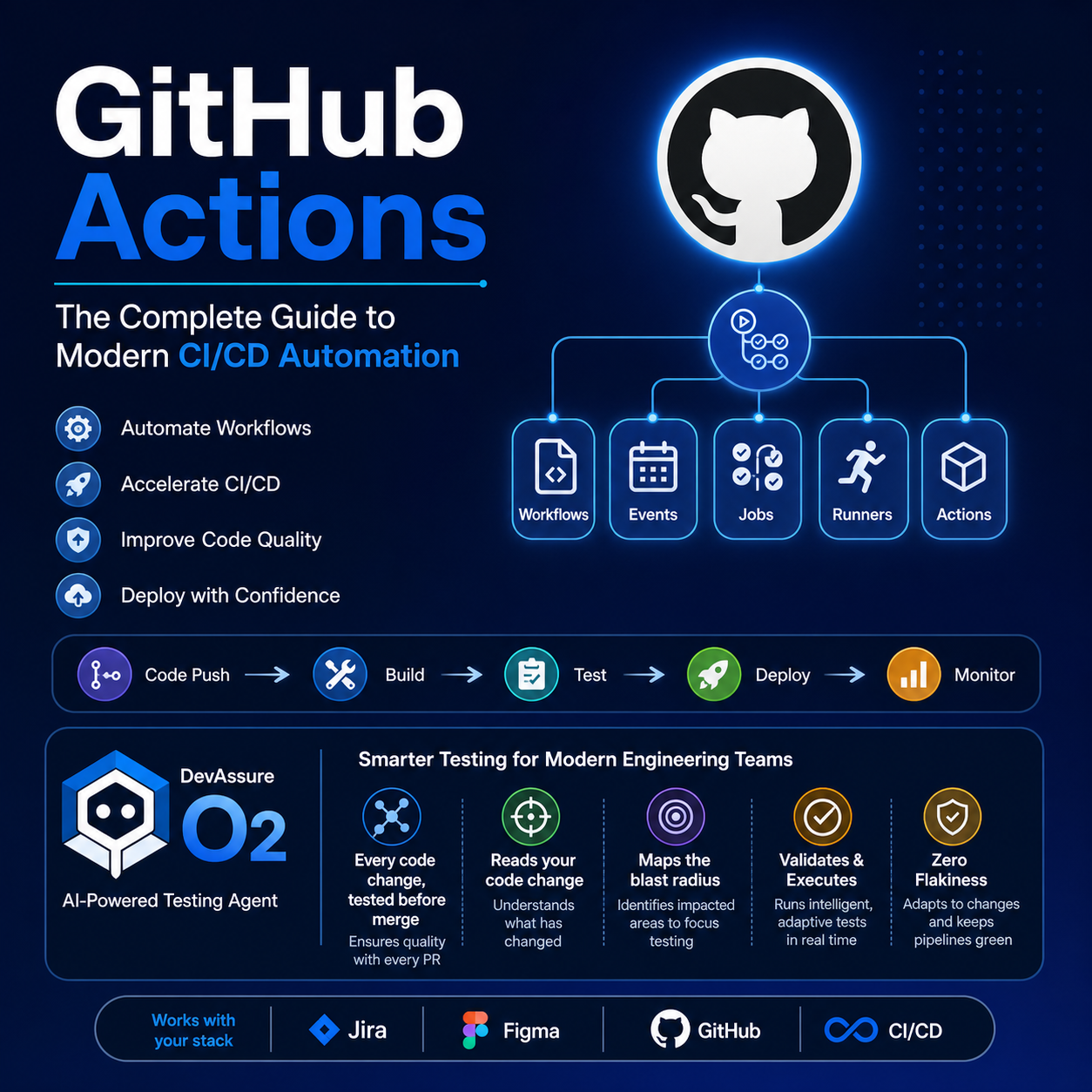
The architecture of GitHub Actions consists of multiple interconnected components that work together to execute workflows.
The core architectural components include:
- Workflows
- Events
- Triggers
- Jobs
- Steps
- Actions
- Runners
- Matrix Strategy
Let us understand each component in detail.
Workflows in GitHub Actions
A workflow is an automated process defined using a YAML file inside a GitHub repository.
Workflow files are usually stored inside:
.github/workflows/
A workflow contains:
- One or more jobs
- Steps to execute
- Trigger conditions
- Actions to perform
Example workflow:
name: CI Pipeline

on:
  push:
    branches:
      - main

jobs:
  build:
    runs-on: ubuntu-latest

    steps:
      - uses: actions/checkout@v4

      - name: Install Dependencies
        run: npm install

      - name: Run Tests
        run: npm test
This workflow automatically runs whenever code is pushed to the main branch.
What are Events in GitHub Actions?
Events are activities that occur inside a GitHub repository and initiate workflows.
GitHub Actions continuously listens for repository events and triggers workflows accordingly.
Common GitHub Events include:
| Event | Description |
|---|---|
| push | Triggered when code is pushed |
| pull_request | Triggered during PR activities |
| release | Triggered during releases |
| workflow_dispatch | Manual trigger |
| schedule | Time-based trigger |
| issue_comment | Triggered when comments are added |
| deployment | Triggered during deployments |
Events are the foundation of workflow automation.
Workflow Triggers
Workflow triggers define when a GitHub Actions workflow should execute.
Triggers are configured using the on: keyword.
Example:
on:
  push:
    branches:
      - main
This means the workflow runs whenever code is pushed to the main branch.
Types of Workflow Triggers
Push Trigger
on: push
Executes workflows whenever code changes are pushed.
Pull Request Trigger
on: pull_request
Runs workflows when PRs are opened, updated, or merged.
Scheduled Trigger
on:
  schedule:
    - cron: '0 0 * * *'
Runs workflows at scheduled intervals.
Manual Trigger
on: workflow_dispatch
Allows developers to manually execute workflows.
Multiple Triggers
on:
  push:
  pull_request:
A workflow can respond to multiple events simultaneously.
Workflow triggers help engineering teams automate development operations with precision.
GitHub Actions Jobs
A job is a set of steps executed on the same runner.
Each workflow can contain one or multiple jobs.
Example:
jobs:
  build:
    runs-on: ubuntu-latest

  test:
    runs-on: ubuntu-latest
Jobs can:
- Run sequentially
- Run in parallel
- Depend on other jobs
Example with dependency:
jobs:
  build:
    runs-on: ubuntu-latest

  test:
    needs: build
    runs-on: ubuntu-latest
Here, the test job executes only after the build job completes successfully.
Jobs enable modular automation inside workflows.
GitHub Actions Matrix
GitHub Actions Matrix allows workflows to run across multiple environments simultaneously.
It is commonly used for:
- Cross-browser testing
- Multiple Node.js versions
- Multiple operating systems
- Multiple runtime configurations
Example:
strategy:
  matrix:
    os: [ubuntu-latest, windows-latest]
    node: [16, 18]
This creates four execution combinations:
| OS | Node Version |
|---|---|
| Ubuntu | 16 |
| Ubuntu | 18 |
| Windows | 16 |
| Windows | 18 |
Benefits of Matrix Strategy:
- Parallel execution
- Faster validations
- Environment compatibility testing
- Broader test coverage
Matrix execution significantly improves CI efficiency.
Actions in GitHub Actions
Actions are reusable automation components that perform specific tasks.
They are the building blocks of workflows.
Examples include:
- Checking out repositories
- Setting up Node.js
- Running Docker containers
- Deploying applications
- Running tests
Example:
- uses: actions/checkout@v4
This action checks out repository code into the runner.
GitHub Marketplace offers thousands of reusable actions for:
- CI/CD
- Cloud deployments
- Notifications
- Security scanning
- Testing
- Containerization
Actions help developers avoid repetitive scripting and accelerate workflow creation.
Runners in GitHub Actions
A runner is the execution environment where workflows run.
When a workflow is triggered, GitHub assigns it to a runner.
Types of Runners
GitHub Hosted Runners
Managed by GitHub.
Supported environments include:
- Ubuntu
- Windows
- macOS
Example:
runs-on: ubuntu-latest
Self Hosted Runners
Hosted and managed by organizations themselves.
Benefits include:
- Custom environments
- Internal infrastructure access
- Better hardware control
- Enterprise compliance
Runners execute jobs, steps, and actions inside workflows.
CI/CD with GitHub Actions
Continuous Integration and Continuous Deployment are critical components of modern DevOps.
What is Continuous Integration?
Continuous Integration (CI) is the practice of automatically validating code whenever developers commit changes.
CI typically includes:
- Automated builds
- Unit testing
- Code quality validation
- Security scanning
What is Continuous Deployment?
Continuous Deployment (CD) automates software delivery into staging or production environments.
CD includes:
- Automated deployments
- Infrastructure provisioning
- Release automation
- Rollback strategies
How GitHub Actions Helps with CI/CD
GitHub Actions simplifies CI/CD by enabling developers to:
- Build pipelines directly inside repositories
- Trigger workflows automatically
- Execute tests before merging
- Deploy applications automatically
- Monitor workflow executions
- Integrate with cloud platforms
GitHub Actions supports integrations with:
- AWS
- Azure
- Google Cloud
- Docker
- Kubernetes
- Jenkins
- Slack
This makes GitHub Actions a powerful DevOps automation platform for modern engineering teams.
DevAssure O2 in GitHub Actions
Modern engineering teams need more than static automation pipelines. Traditional CI/CD systems often struggle with:
- Flaky test suites
- Slow regression execution
- Massive test maintenance
- Poor impact analysis
- Inefficient pipeline execution
This is where DevAssure O2 Agent transforms software testing inside GitHub Actions.
What is DevAssure O2 Agent?
DevAssure O2 Agent is an AI-powered autonomous testing agent that integrates directly into GitHub workflows and CI/CD pipelines.
Instead of running static regression suites, O2 intelligently analyzes every code change and dynamically validates the impacted areas.
The O2 Agent can:
- Read code changes
- Understand application impact
- Map the blast radius
- Generate targeted tests
- Execute validations automatically
- Adapt to UI changes in real time
This allows engineering teams to validate every pull request before merge with significantly higher confidence.
How O2 Agent Helps Engineering Teams
Autonomous Impact Mapping
Traditional automation pipelines often execute large regression suites regardless of the actual code change.
O2 solves this using intelligent dependency analysis.
The agent:
- Reads code diffs
- Builds dependency maps
- Identifies impacted modules
- Executes only relevant validations
This dramatically reduces execution time while improving testing precision.
Dynamic Test Case Generation
Modern applications evolve continuously.
Maintaining static test suites becomes expensive and time consuming.
O2 dynamically:
- Creates end-to-end scenarios
- Updates existing flows
- Adapts coverage automatically
- Generates validations for new functionality
This helps teams maintain scalable automation coverage with minimal manual effort.
Works with Existing Tech Stack
O2 integrates seamlessly into existing engineering ecosystems.
It works with:
- GitHub Actions
- Jira
- Figma
- CI/CD pipelines
- Existing repositories
- Existing automation frameworks
Engineering teams do not need to rebuild their workflows from scratch.
Zero Flakiness
Flaky automation is one of the biggest challenges in CI/CD.
Traditional scripts fail whenever:
- Selectors change
- UI layouts shift
- Flows evolve
O2 adapts dynamically in real time.
Instead of failing immediately, the agent intelligently modifies execution paths to maintain stability and reduce flaky failures.
This enables highly reliable automation pipelines.
Example Workflow with DevAssure O2
Example GitHub Actions workflow integrating O2:
name: DevAssure O2 Validation

on:
  pull_request:

jobs:
  validate:
    runs-on: ubuntu-latest

    steps:
      - uses: actions/checkout@v4

      - name: Run O2 Agent
        uses: devassure/o2-agent@v1
Whenever a pull request is created, O2 automatically validates impacted areas before merge.
This enables:
- Faster releases
- Smarter testing
- Reduced regressions
- Better release confidence
Benefits of GitHub Actions
Key benefits of GitHub Actions include:
- Native GitHub integration
- Faster automation setup
- Scalable CI/CD
- Marketplace integrations
- Parallel execution
- Flexible workflows
- Cloud deployment automation
- Improved developer productivity
Combined with AI-powered platforms like DevAssure O2, GitHub Actions becomes even more powerful for modern DevOps teams.
Conclusion
GitHub Actions has transformed how modern engineering teams build, test, and deploy software. Its native integration with GitHub, flexible workflows, reusable actions, and scalable CI/CD capabilities make it one of the most widely adopted automation platforms in software development today.
From automated builds and testing to deployments and infrastructure orchestration, GitHub Actions empowers teams to accelerate delivery while maintaining software quality.
However, as applications become increasingly complex, static automation pipelines alone are no longer sufficient. AI-powered systems like DevAssure O2 Agent introduce a new era of intelligent CI/CD automation by dynamically understanding code changes, generating adaptive test coverage, and eliminating flaky execution.
For a step-by-step PR workflow (Playwright YAML vs autonomous agent), see How to automatically test every pull request in 2026.
Together, GitHub Actions and DevAssure O2 help organizations build faster, release confidently, and achieve highly scalable modern DevOps automation.