Add Power to Your TestRail Test Cases with DevAssure

Your team already plans and tracks tests in TestRail. The gap is execution: turning those cases into reliable UI automation without a second script suite to maintain. DevAssure closes that loop—fetch cases from TestRail, run them in a real browser with an AI agent, and optionally sync results, defects, and videos back to TestRail.
Every TestRail workflow in this guide is available in two places: the @devassure/cli for terminals and CI/CD, and the DevAssure VS Code extension (VSCE) for interactive runs from the IDE. Configure once—credentials and post-result settings are shared between both.
Introduction: Why TestRail matters
TestRail is a widely adopted test management platform built for QA teams who need a single place to organize test cases, plan execution, track results, and report on quality. Instead of scattering cases across spreadsheets or wikis, teams use TestRail’s structured repository—projects, suites, sections, cases, runs, and milestones—to keep manual and automated testing aligned with releases.
For software teams, TestRail delivers:
- Centralize test strategy — Manual, automated, and exploratory work lives in one hub with clear workflows.
- Plan and execute efficiently — Test runs, plans, and milestones organize work by sprint or release.
- Improve visibility — Dashboards and reports surface coverage, failures, and bottlenecks for engineering and product leaders.
- Integrate with your stack — Native connections to Jira, CI/CD, automation frameworks, and a full REST API for custom automation.
More on TestRail for software teams.
TestRail also supports traceability (linking requirements, cases, and defects) and enterprise controls such as role-based access and audit trails—making it a strong system of record for what to test and what happened during execution.
The gap many teams still feel is on the execution side: turning well-written TestRail cases into reliable, up-to-date UI automation without maintaining brittle scripts. That is where DevAssure fits in.
DevAssure: Execute TestRail cases with an AI testing agent
DevAssure is an AI-powered testing platform centered on DevAssure O2—an agent that understands your application, executes tests in a real browser, and adapts when the UI changes. You describe steps in plain English (or manage them in TestRail); DevAssure interprets intent and runs the flow—no traditional test scripts required.
Key benefits for teams already using TestRail:
| Benefit | What it means for you |
|---|---|
| Scriptless execution | TestRail steps written in natural language can be run directly by the DevAssure agent. |
| Real browser validation | End-to-end checks run against Chromium, Chrome, or Edge with configurable headless/headed modes. |
| Closed loop with TestRail | Fetch cases from TestRail, execute them, then optionally post results, log defects, and attach session videos back to TestRail runs. |
| CLI and VSCE workflows | Run TestRail cases from the CLI in CI/CD or from the VS Code extension (VSCE) in the IDE—same provider config, filters, and post-result options. |
| PR-native testing (O2) | For code-change workflows, O2 maps blast radius and generates or updates checks—complementary to your TestRail catalog. Learn more at DevAssure O2. |
DevAssure treats TestRail as a test provider: an external source from which cases are fetched, executed, and—when configured—reported back automatically.
Prerequisites
Before connecting TestRail, ensure you have:
- A DevAssure account — Sign up (free trial available)
- TestRail API access — Your TestRail URL, username, and API key (Administration → Site Settings → API in TestRail)
- DevAssure CLI or VSCE installed and signed in — Install the
@devassure/cli(npm install -g @devassure/cli) or the DevAssure VS Code extension (VSCE), then sign in withdevassure loginor from the extension sidebar - Add test data (optional) — Initialize .devassure by running
devassure initcommand and include any data like credentials in.devassure/test_data.yamlfile. Reference documentation - Initialize and add test data
How to configure TestRail in DevAssure
DevAssure stores TestRail credentials in an encrypted file: <secrets-directory>/testrail.enc.json. Credentials are never written to your repo in plain text. You can add and update this config from the CLI or VSCE—both write to the same file.
Add provider config
CLI — interactive setup (recommended the first time):
devassure add-provider-config



When prompted, choose provider testrail and enter:
| Field | Description |
|---|---|
| URL | Your TestRail instance, e.g. https://yourcompany.testrail.io |
| Username | TestRail user email or username |
| API key | TestRail API key |
| Project ID | Optional default project; leave empty if your account has only one project |
CLI — non-interactive setup (CI or scripting):
devassure add-provider-config \
  --provider testrail \
  --url https://yourcompany.testrail.io \
  --username qa-user@company.com \
  --api-key YOUR_API_KEY \
  --project-id 42
VSCE — equivalent steps
- Open the DevAssure Configuration view in the sidebar.
- Click DevAssure: Add Provider Config in the view title bar, or run the command from the Command Palette.
- Select testrail if prompted.
- Enter URL, username, API key, and optional project ID.
Configure how results are posted back (recommended before first run)
Before running TestRail cases, decide whether DevAssure should update TestRail after execution. The same options are available in CLI flags and VSCE settings.
VSCE — Command Palette
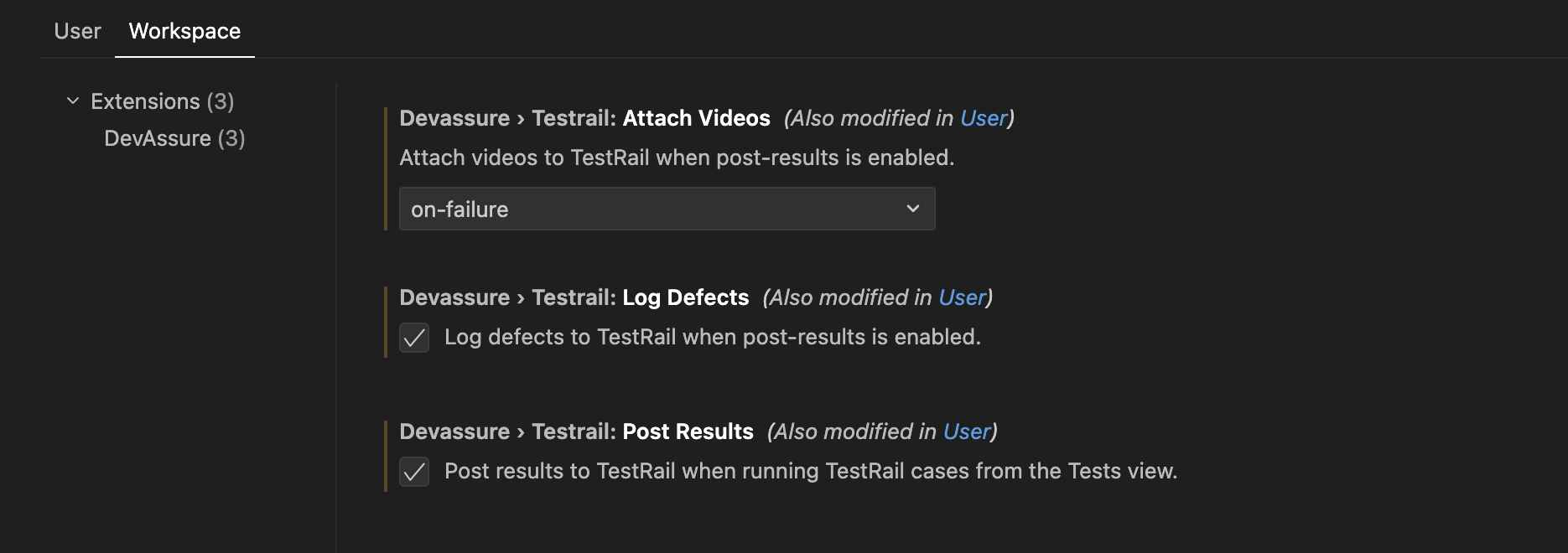
Run DevAssure: TestRail post result settings (devassure.testRailPostResultSettings) to configure:
- Post results to TestRail — on/off
- Log defects to TestRail — on/off (only when post results is enabled)
- Attach videos to TestRail —
Never,On-Failure, orAlways(only when post results is enabled)
VSCE — Workspace settings
| Setting | Default | Purpose |
|---|---|---|
devassure.testrail.postResults | false | Create/update TestRail run results after execution |
devassure.testrail.logDefects | false | Log defects for issues found during the run |
devassure.testrail.attachVideos | never | never | on-failure | always |
CLI equivalents (used with --provider testrail):
--post-results— Post execution results to TestRail--log-defects— Requires--post-results; enables defect logging (--add-defectson the agent)--attach-videos <mode>— Requires--post-results;never,on-failure, oralways
Example combining all three on a run:
devassure run --provider testrail \
  --labels=smoke \
  --post-results \
  --log-defects \
  --attach-videos=on-failure
How to run TestRail cases from DevAssure
Once TestRail is configured, DevAssure fetches cases from TestRail instead of local YAML/CSV.
Use devassure run in the CLI, or Run TestRail cases / Run TestRail cases by id in the VSCE Tests view—the same filters apply in both.
Run by section, labels and priority
CLI:
devassure run --provider testrail \
  --section=user_management \
  --labels=smoke,regression \
  --priority=P0 \
  --post-results
VSCE:



Run by project and case IDs
CLI:
devassure run --provider testrail \
  --project-id=42 \
  --case-ids=1001,1002 \
  --post-results
Run by section with defects and videos on failure
CLI:
devassure run --provider testrail \
  --filter="section=Regression && priority=P0" \
  --post-results \
  --log-defects \
  --attach-videos=on-failure
Structured filter flags
| Flag | Description |
|---|---|
--provider testrail | Fetch cases from TestRail |
--project-id | TestRail project ID |
--suite-id | Suite ID (multi-suite projects) |
--section | Section name |
--labels | Comma-separated labels |
--priority | Comma-separated priorities |
--case-ids | Comma-separated case IDs (other filters are ignored) |
Raw filter (advanced): use --filter with && only (no || or parentheses).
CLI:
devassure run --provider testrail \
  --filter="labels=smoke,regression && priority=P0" \
  --post-results
VSCE: Run from the Tests view
After configuration, the Tests view shows:
- Run TestRail cases — Pick project (if not saved), suite (for multi-suite projects), then optional section, priority, and labels.
- Run TestRail cases by id — Enter comma-separated case IDs.
Execution logs appear in Run Logs, same as local YAML/CSV runs.
CI/CD example (CLI)
devassure add-token "$DEVASSURE_TOKEN"
devassure run --provider testrail \
  --labels=smoke \
  --post-results \
  --attach-videos=on-failure \
  --archive=./test-reports
devassure summary --last --json
How results are posted back to TestRail
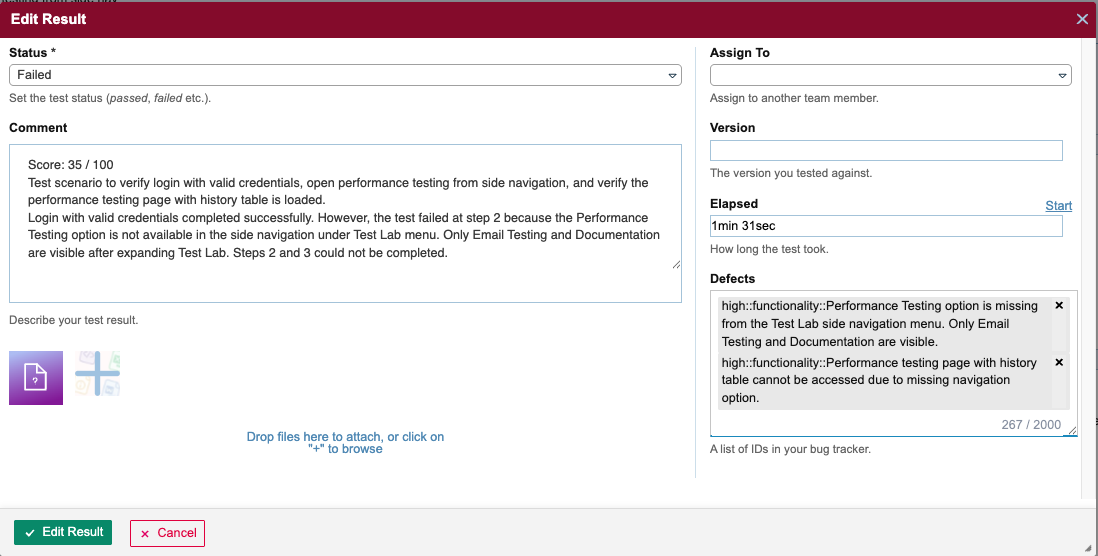
When --post-results (or devassure.testrail.postResults) is enabled, DevAssure syncs execution outcomes to TestRail automatically:
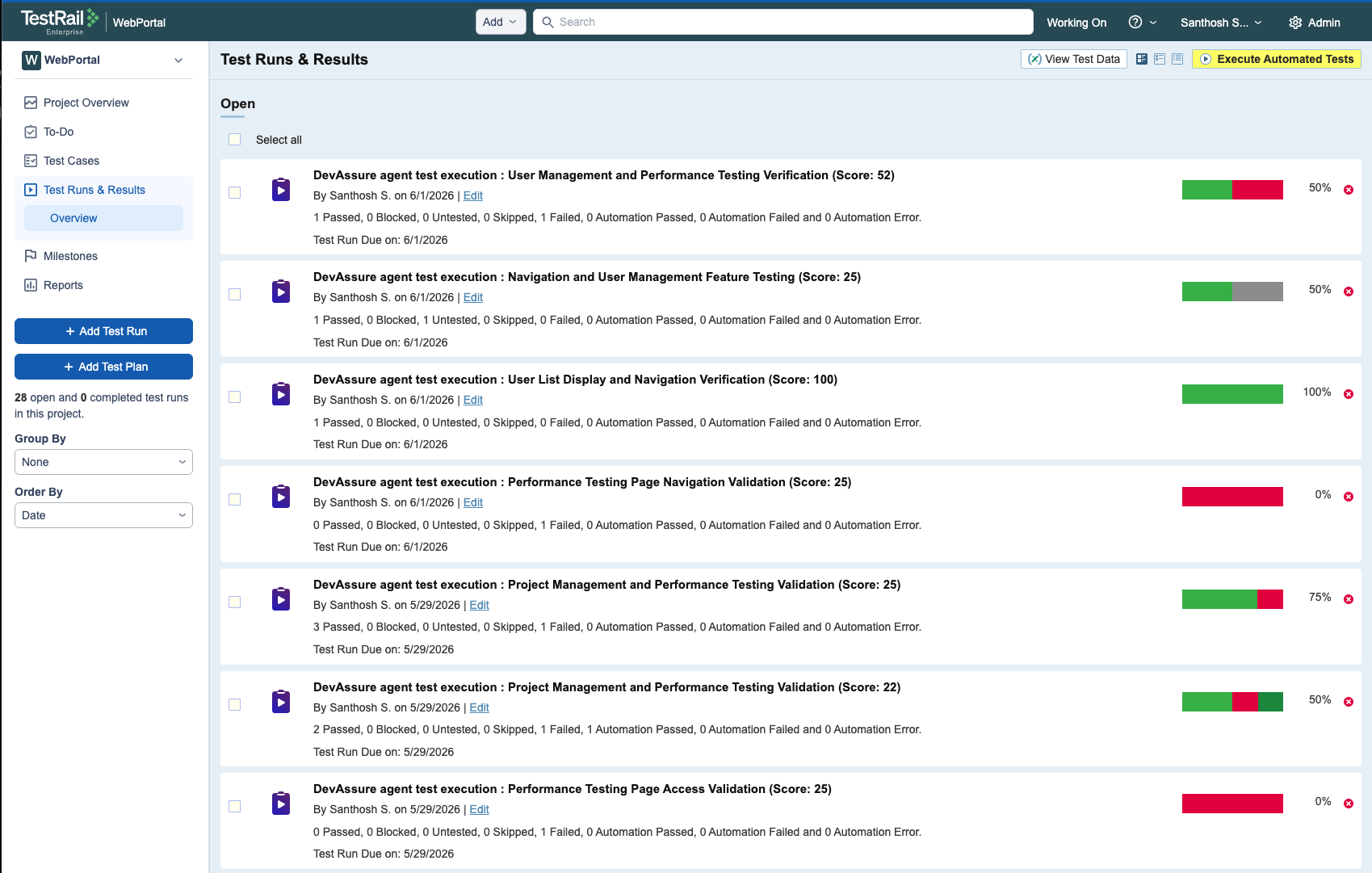
-
A TestRail run is created for the session, and every executed test case is attached to that run.
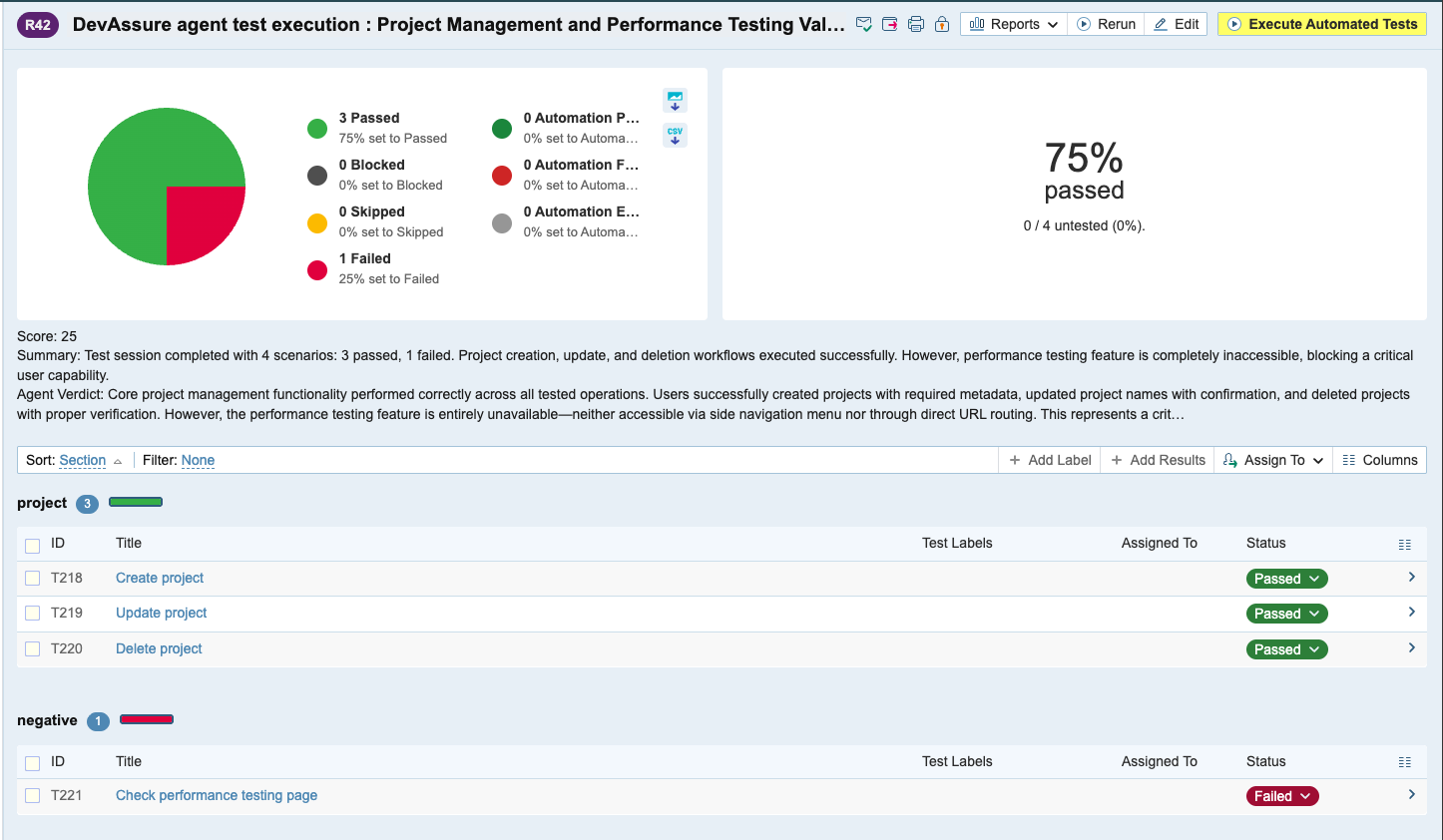
-
A result is posted for each test—pass, fail, or blocked—so individual case status is recorded in TestRail without manual entry.
-
Execution summaries are added at both levels—each test result includes a summary of what happened during that case, and the run itself gets an overall execution summary and score (pass/fail counts and run-level metrics) so dashboards and reports reflect the full session at a glance.
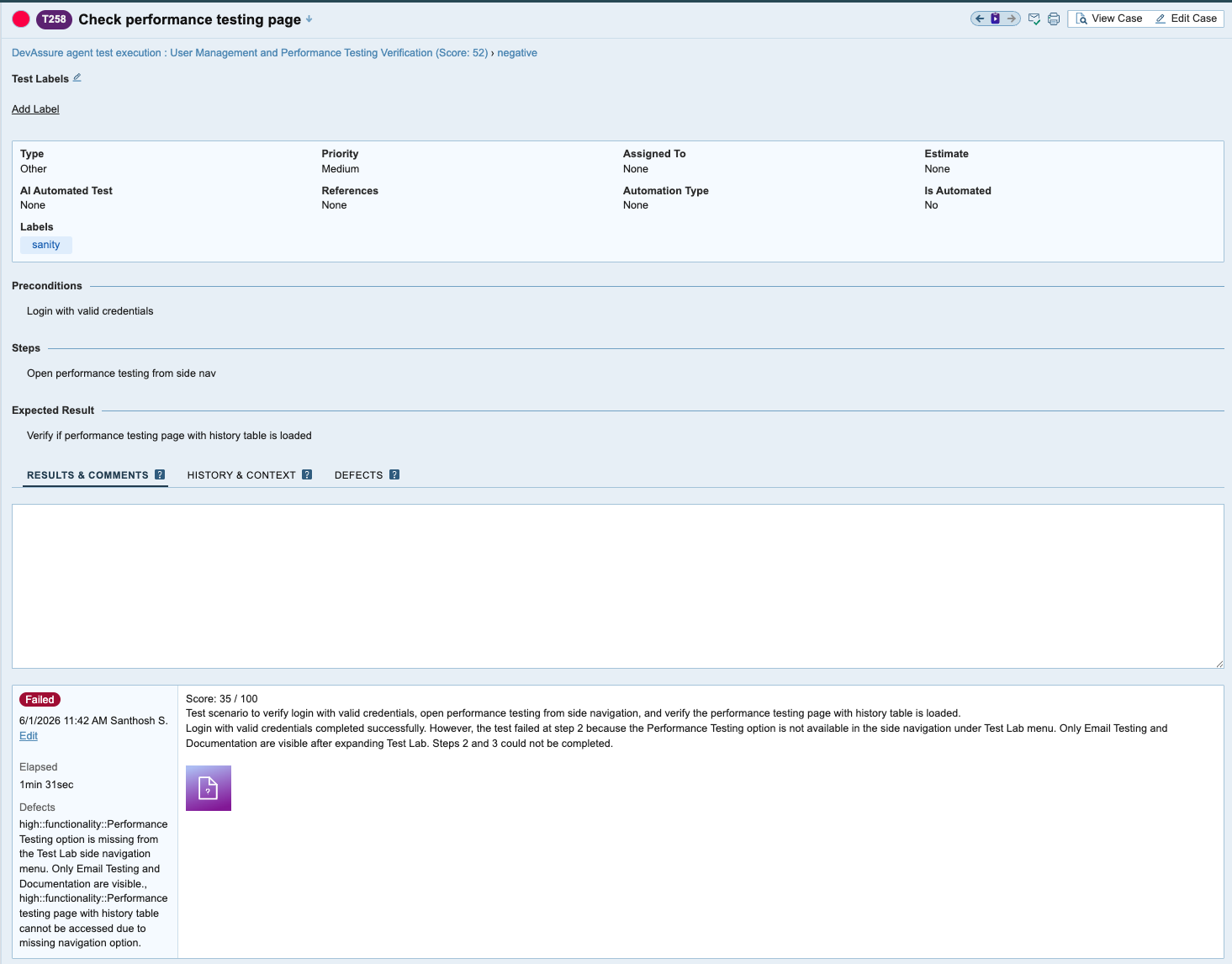
Your TestRail dashboards and reports stay current as soon as DevAssure finishes executing.
Defects created in TestRail
Enable --log-defects (CLI) or Log defects to TestRail (VSCE) together with post results.
When the DevAssure agent finds a bug during execution, it can log a defect in TestRail linked to the failing case—giving testers and developers a traceable record inside the same tool they already use for test management. This maps to the agent flag --add-defects and requires both --post-results and --provider testrail.
Typical workflow:
- A TestRail case fails during DevAssure execution.
- With defect logging on, DevAssure creates a TestRail defect with context from the failure.
- Your team triages the defect in TestRail (and can link to Jira or other integrations TestRail already supports).
Video attachments for reference
Session recordings help reproduce failures without re-running locally. Enable video attachment with --attach-videos in the CLI or Attach videos to TestRail in VSCE post result settings.
| Mode | Behavior |
|---|---|
never | Do not attach videos (default) |
on-failure | Attach video when a case fails |
always | Attach video for every case |
Videos are attached to the TestRail run when results are posted, giving reviewers a visual record of what the browser did—clicks, navigation, and UI state at failure time.
CLI:
devassure run --provider testrail \
  --case-ids=1001,1002 \
  --post-results \
  --attach-videos=on-failure
End-to-end workflow at a glance
TestRail cases
      │
      │  Fetch via API
      ▼
   DevAssure ──► AI agent executes in browser ──► Pass / Fail
                                                      │
                    ┌─────────────────────────────────┼──────────────────────────────┐
                    │                                 │                              │
           (optional) post-results           (optional) log-defects         (optional) attach-videos
                    ▼                                 ▼                              ▼
           TestRail run updated               TestRail defect                   Video on result
           (+ run summary & score)            (linked to failing case)          (on test result)
- Author and organize cases in TestRail (sections, priorities, labels).
- Configure TestRail credentials once in DevAssure—via CLI or VSCE.
- Run selected cases via CLI, VSCE, or CI.
- Review DevAssure reports locally; sync outcomes to TestRail when post settings are enabled.
- Triage defects and watch session videos directly in TestRail.
Tips for a smooth integration
- Write executable steps in TestRail — Natural-language steps work best when they are action-oriented (“Log in as admin”, “Verify dashboard shows welcome message”).
- Keep project ID in config for multi-project accounts to skip project selection prompts.
- Use
--suite-idwhen your TestRail project uses multiple suites (suite_mode= multiple). - Start with
--attach-videos=on-failureto balance storage and debuggability. - Align environments — Use
devassure inittest data (test_data.yaml) and--environmentso URLs and credentials match the target under test.
Summary
TestRail remains the system of record for what to test and how releases are tracked. DevAssure adds execution power from the CLI or VSCE: run those same cases in a real browser with an AI agent, optionally post results, log defects, and attach videos—so your TestRail investment extends from planning into fast, maintainable automation without maintaining a separate script suite.
Yes. After you configure TestRail as a provider, DevAssure fetches cases from your TestRail project via the API and executes them in a real browser. You can filter by project, suite, section, labels, priority, or case IDs from the CLI or VSCE.
Learn more
| Resource | Link |
|---|---|
| TestRail product | https://www.testrail.com/ |
| TestRail API getting started | https://www.gurock.com/testrail/docs/api/getting-started/ |
| DevAssure | https://www.devassure.io/ |
DevAssure CLI (@devassure/cli) | https://www.npmjs.com/package/@devassure/cli |
| DevAssure VS Code extension | https://marketplace.visualstudio.com/items?itemName=DevAssure.devassure-agent-vscode-extension |
| DevAssure O2 | https://www.devassure.io/o2-testing-agent |
| Sign up | https://app.devassure.io/sign_up |
| Schedule a demo | https://www.devassure.io/schedule-demo |
Have questions or want a walkthrough for your team? Book a demo or start a free trial.